
 Webpop Design Marketing Team
Choosing the best ecommerce platform is one of the most important decisions you’ll make for your online business. It affects how quickly you can launch, how much control you have, how your checkout works, how well your store ranks in Google, and how easily you can keep improving the site as the business grows.
Quick Verdict: WooCommerce or Shopify?
- Choose Shopify if: you want a beginner-friendly ecommerce platform, have limited technical skills, prefer a managed setup, and value support and reliability over control.
- Choose WooCommerce if: you already use WordPress, want full control and data ownership, plan to invest in content marketing and ecommerce SEO, or need highly specific customisation.
- It’s a close call if: you’re a growing UK business with some technical capacity. In that case, total cost of ownership, your content strategy, checkout requirements and your team’s familiarity with WordPress ecommerce will usually decide it.
In any serious ecommerce platform comparison, WooCommerce vs Shopify dominates the conversation. Between them, they power a significant share of the world’s online stores, but they take fundamentally different approaches. WooCommerce gives you an open-source toolkit to build exactly what you want on WordPress, while Shopify gives you a polished, hosted ecommerce platform you can launch quickly.
This guide walks through the real differences between WooCommerce and Shopify, including setup, pricing, design freedom, ecommerce SEO, payment gateways, checkout, scalability, VAT, UK payment options and long-term ownership, so you can choose the best ecommerce platform for your business with more confidence.
Shopify is often the better choice when speed, simplicity and low technical responsibility matter most. WooCommerce is often the better choice when your ecommerce website needs to do more than sell standard products through a conventional checkout.
If you are about to invest properly in ecommerce website design, the question worth asking is which platform will create fewer compromises for the way your business actually sells.
WooCommerce at a Glance
WooCommerce is a free, open-source plugin that turns any WordPress website into a fully-featured online store. Because WooCommerce sits on top of WordPress, you inherit one of the most mature content management systems on the web, along with its enormous ecosystem of plugins, themes, integrations and developers.
The trade-off is responsibility. You choose and pay for your own hosting, manage security and maintenance, and handle updates yourself, or pay a developer or agency to manage them properly. For businesses with technical resources or a trusted ecommerce development partner, this is a strength rather than a weakness. You get full control, stronger ownership and the ability to change almost anything.
For solo founders with no technical support, WooCommerce can become a distraction from selling. For content-led businesses, B2B sellers, wholesale stores, subscription brands and companies with complex product or checkout requirements, that flexibility can be exactly what makes it the better long-term choice.
Best for: content-led brands, businesses already on WordPress, stores with unusual product or checkout requirements, B2B and wholesale ecommerce, and anyone prioritising long-term flexibility over convenience.
Shopify at a Glance
Shopify is a fully hosted ecommerce platform that runs on a subscription model. You sign up, pick a theme, add products, connect payments, and you can start selling without worrying about hosting, software updates, server configuration or PCI compliance.
The simplicity comes at the cost of flexibility. You’re working within Shopify’s framework, using its themes and apps, and paying its monthly fees. If you use a third-party payment provider instead of Shopify Payments, Shopify also charges a small percentage on each sale on its main plans.
For many small and mid-sized retailers, that trade-off pays off. Shopify removes a lot of technical friction, which means the team can focus on products, photography, advertising, email marketing, fulfilment and customer service instead of plugin conflicts or hosting issues.
Best for: first-time store owners, straightforward product-led retailers, businesses that want to launch quickly, teams without technical resource, and anyone who values managed infrastructure, 24/7 support and reliability.
WooCommerce vs Shopify: Comparison Table
| Feature | WooCommerce | Shopify |
|---|---|---|
| Pricing model | Free plugin; you pay for hosting, domain, plugins, themes and development where needed | Monthly subscription, with extra costs for apps, themes and some payment setups |
| Hosting | Self-managed; you choose the hosting provider | Fully hosted ecommerce platform, managed by Shopify |
| Setup time | Longer setup, usually needs WordPress knowledge | Fast setup, beginner-friendly and guided |
| Customisation | Very high; open-source, developer-friendly and highly flexible | Strong for standard ecommerce, but constrained by Shopify’s framework |
| Themes available | Thousands of WordPress and WooCommerce themes, free and paid | Official Shopify themes plus third-party theme marketplaces |
| Plugins and apps | Large WordPress and WooCommerce plugin ecosystem | Large Shopify app ecosystem |
| Ecommerce SEO | Excellent for content-led SEO, flexible URLs, landing pages and schema control | Solid built-in SEO, but less flexible URL and content structure |
| Blogging and content | Best-in-class through WordPress | Functional, but not as strong as WordPress for content marketing |
| Payment gateways | Wide gateway support, with no extra transaction fees charged by WooCommerce | Wide gateway support, with extra Shopify transaction fees if using third-party payment providers |
| Checkout experience | Highly customisable, including bespoke checkout flows | Polished and conversion-focused, but advanced checkout changes usually need Shopify Plus |
| Security and maintenance | Your responsibility, usually handled through hosting, updates, backups and developer support | Handled by Shopify as part of the hosted platform |
| Support and reliability | Documentation, community support, plugin support, hosting support and paid developers | Centralised Shopify support and managed infrastructure |
| Scalability | High, with the right hosting, optimisation and development support | High, with a clearer hosted upgrade path through Shopify plans and Shopify Plus |
| Data ownership | Full ownership of your site, store files, database and content | Hosted within Shopify’s platform and infrastructure |
| VAT and UK payment options | Flexible, but often needs careful configuration and plugins | More guided setup, with strong native options for UK merchants |
| Typical fit | Best where SEO, content, custom functionality, ownership or complex workflows matter | Best where speed, simplicity, managed hosting and standard ecommerce operations matter |
Ease of Use and Setup Time
Shopify is the more beginner-friendly platform by some distance. Setup is deliberately frictionless: sign up for a trial, pick a theme, add your first product, connect a payment method, and you have a working store. Most people can launch a basic shop quickly. The admin interface is clean, the onboarding is guided, and there is nothing to install or configure at the server level.
WooCommerce has more steps, though none of them are especially hard if you are comfortable with WordPress ecommerce. A typical setup looks like:
- Register a domain and sign up for WordPress hosting, with Kinsta and WP Engine both popular managed options.
- Install WordPress, which most hosts can do through a one-click installation.
- Install and activate the WooCommerce plugin.
- Run the setup wizard to configure currency, tax, shipping and payments.
- Choose and customise a WooCommerce-compatible theme.
- Add products, set up shipping zones, and install any additional plugins your store needs.
Expect more planning with WooCommerce, and budget for a developer if you want anything beyond a standard setup. That extra setup time is what buys you more control later on.
For a simple store with standard products, Shopify is easier. For a store where ecommerce needs to sit alongside rich content, landing pages, custom quote flows, subscriptions, wholesale pricing or bespoke integrations, WooCommerce may be the better foundation despite the extra setup work.
WooCommerce vs Shopify Pricing
When it comes to WooCommerce vs Shopify pricing, “free” is the word that misleads people. WooCommerce is free as software, but hosting, premium plugins, paid themes, developer time and maintenance all add up. Hidden ecommerce costs can surprise founders who only budgeted for the obvious line items.
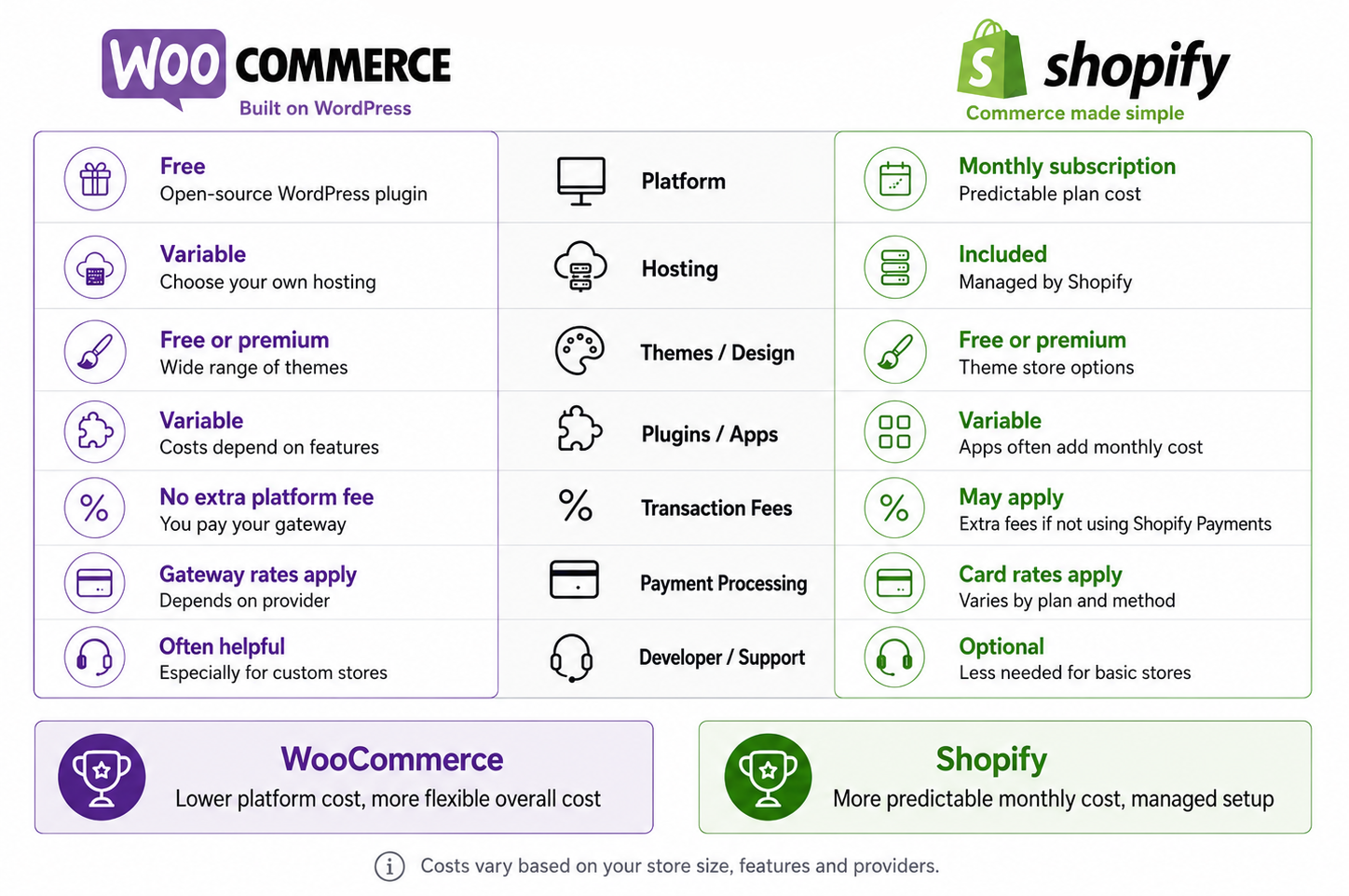
WooCommerce costs vary by setup, while Shopify offers more predictable monthly pricing for UK ecommerce stores.
Shopify is more predictable on the surface because the platform cost is packaged into a monthly subscription. That does not mean it is always cheaper. Paid apps, premium themes and payment charges can all affect the real monthly cost. The better question is total cost of ownership across two or three years, not the headline price on day one.
Typical WooCommerce monthly costs:
- Hosting: £5–£30 for basic shared hosting, or £25–£200+ for managed WordPress hosting
- Domain: usually around £10/year
- SSL certificate: often free via Let’s Encrypt, or included with hosting
- Premium theme: £0–£100 one-off, or £50–£200/year depending on provider
- Plugins for SEO, backups, security, shipping, subscriptions, payments or custom features: variable
- Developer help: optional for very simple stores, but common for serious ecommerce builds
Typical Shopify costs:
- Monthly subscription: varies by plan and billing cycle
- Shopify Plus: enterprise-level pricing for larger merchants
- Third-party transaction fees: applied when using external payment providers instead of Shopify Payments
- Paid apps: variable, often charged monthly
- Premium themes: optional, but common for stores that want a more polished starting point
- Developer help: less necessary for a basic launch, but still useful for custom design, theme work and integrations
Always check Shopify’s current pricing directly, as plans, fees and promotional rates change. Shopify is usually more predictable, while WooCommerce can be cheaper or more expensive depending on the choices you make.
“The best ecommerce platform isn’t the most powerful one. It’s the one your team can actually run well while you focus on selling.”
Customisation and Full Control
On customisation, WooCommerce gives you far more flexibility. Because it is open source and built on WordPress, you can change almost anything, from checkout flow to product page layout to the HTML of a single button. You get full control and much stronger ownership of your site, store data and content.
Developers can work directly with PHP, CSS, JavaScript, WooCommerce hooks, custom fields, bespoke themes and third-party APIs. That makes WooCommerce especially useful when your store needs to support something more specific than a standard product grid and checkout.
Shopify’s themes are professionally designed, mobile-responsive and genuinely good-looking out of the box. Customisation happens through the theme editor, reusable sections, apps, or by editing Liquid, Shopify’s templating language. You cannot push it as far as WooCommerce, but it is harder to get a poor result. You can build something professional without taking on as much technical responsibility.
If your brand needs a distinctive ecommerce experience, unusual product logic, custom checkout steps, account-based pricing, subscriptions, booking flows, quote requests or deep integration with other systems, WooCommerce gives you more room. If you want a professional, reliable and conventional online shop quickly, Shopify gets you there faster.
Ecommerce SEO and Content Marketing
This is where WooCommerce stands out as an SEO-friendly ecommerce platform with a clear structural advantage. WordPress is one of the strongest CMS options for content-led ecommerce SEO, and WooCommerce inherits that foundation: flexible URLs, unlimited blog posts and landing pages, strong taxonomy control, editable templates, schema flexibility and access to established SEO plugins like Yoast and Rank Math.
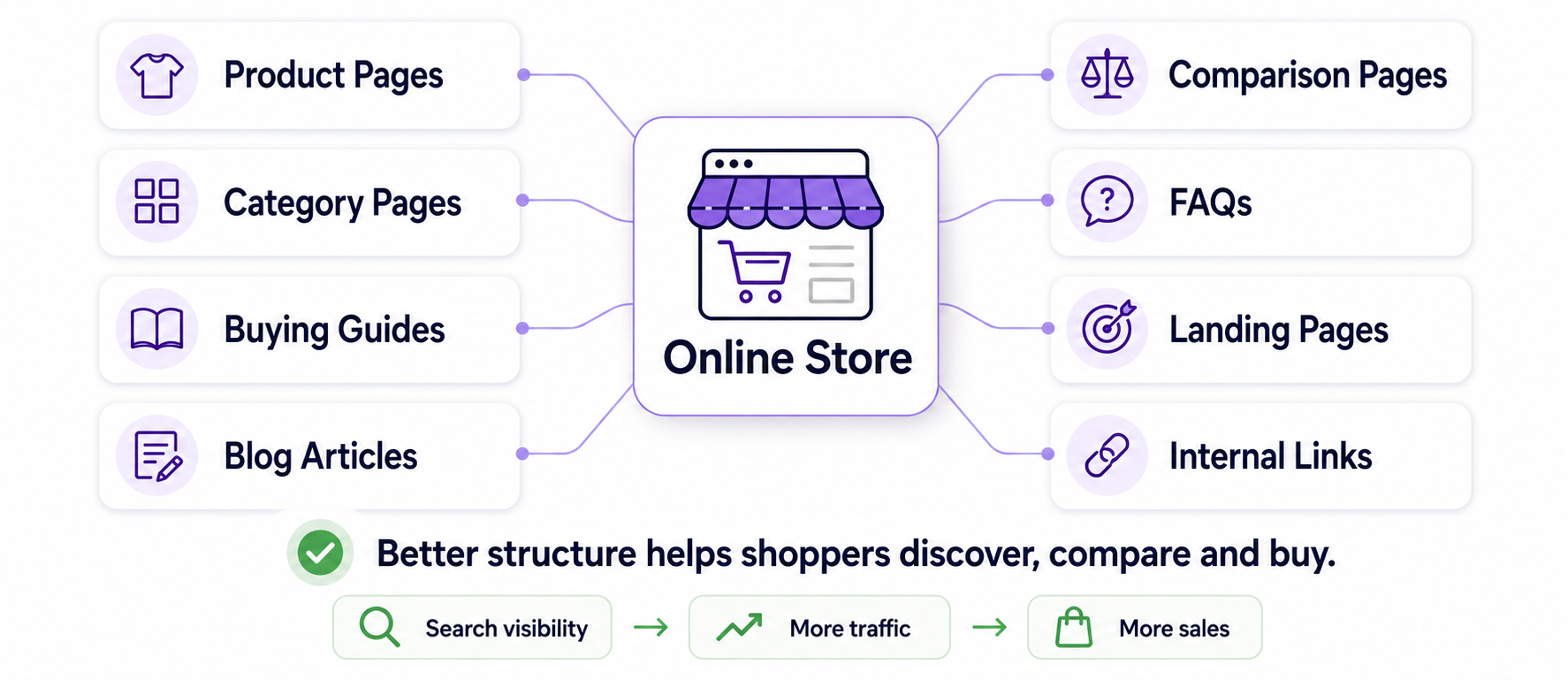
Strong ecommerce SEO connects product pages, guides, FAQs and internal links into a clearer buying journey.
Shopify’s SEO has improved significantly and covers the fundamentals well: customisable meta titles and descriptions, alt text, canonical tags, sitemap generation and product schema. For many stores, especially those relying on paid ads, social commerce, email marketing or an existing audience, Shopify’s SEO is more than good enough.
The limitations are more noticeable when organic search is central to your growth plan. Forced URL structures such as /products/ and /collections/, less flexible content architecture and a weaker blogging experience can make Shopify feel more restrictive for content-heavy ecommerce businesses.
If you are building a content-led brand, creating buying guides, ranking category landing pages, publishing comparison content or relying heavily on long-tail organic search, WooCommerce is usually the stronger foundation. If search is only one part of a broader paid or social strategy, Shopify can still perform very well.
Payment Gateways and Checkout Experience
Both platforms support the major payment options most UK ecommerce businesses need, including Stripe, PayPal, Worldpay, Klarna, Apple Pay, Google Pay and other payment providers.
The key difference is what Shopify charges on payments. It adds a percentage on each sale when you use an external payment provider instead of Shopify Payments. For a store doing meaningful monthly revenue, even a small percentage fee can change the platform maths. WooCommerce does not charge an additional transaction fee on top of your payment gateway, so you only pay your provider, even when using third-party WooCommerce payment gateway plugins.
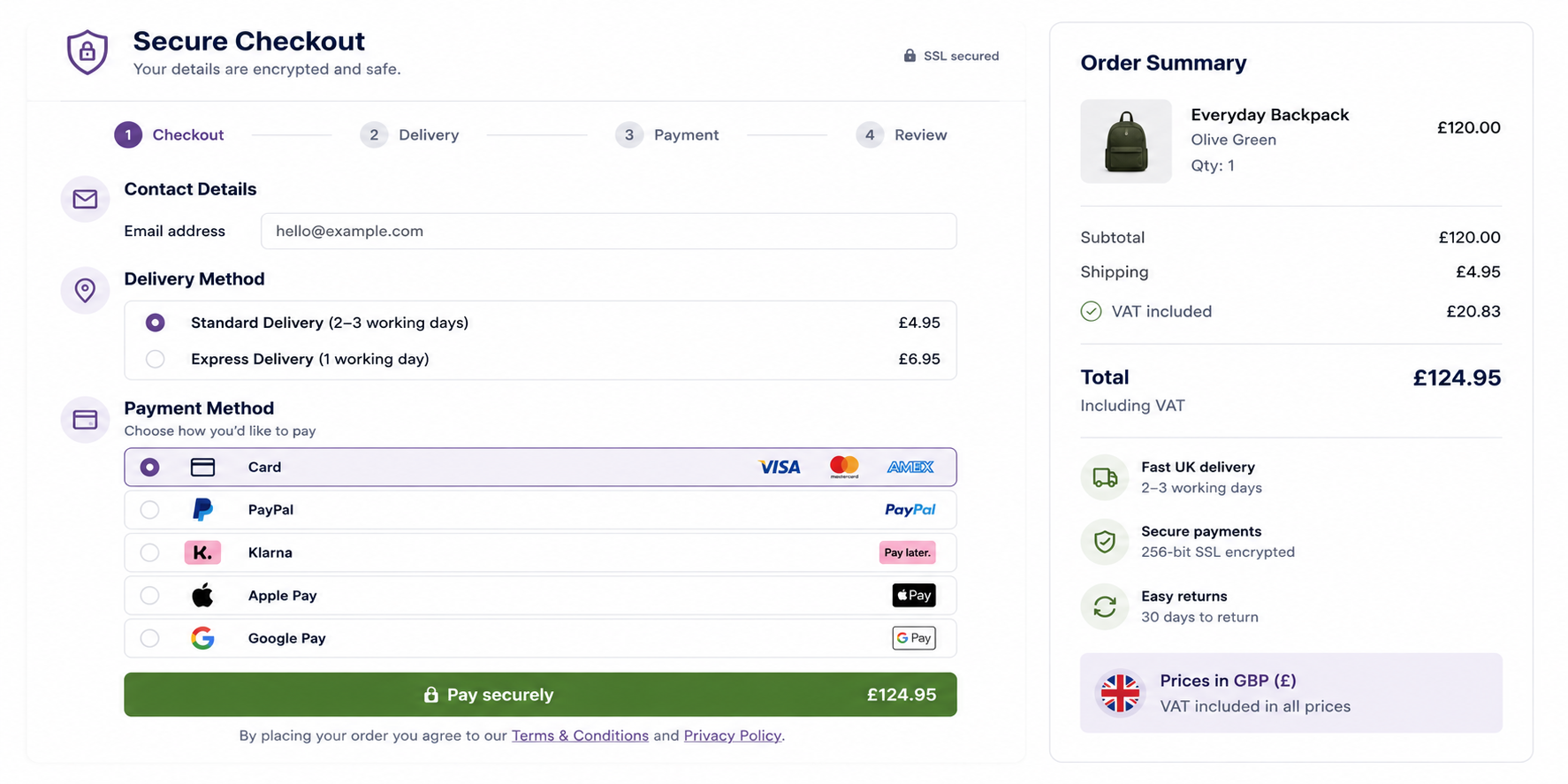
A clear checkout should make payment options, delivery costs and VAT easy to understand before payment.
On checkout experience, Shopify’s checkout is polished, familiar and designed to convert well. That is one of its strongest advantages. The limitation is customisation. Advanced checkout changes are restricted unless you are on Shopify Plus.
WooCommerce gives you more freedom to redesign and restructure the checkout at any level. That matters for brands with specific conversion requirements, account-based pricing, subscriptions, deposits, bookings, custom quote journeys, trade accounts or service-led ecommerce flows.
Scalability and Long-Term Flexibility
Both platforms scale to serious volumes. WooCommerce powers large stores, and Shopify does the same. The difference is how you get there and how much long-term flexibility you retain along the way.
With Shopify, scalability is mostly a matter of using the right plan, choosing the right apps, and eventually moving to Shopify Plus if the business needs enterprise-level features. The infrastructure handles traffic spikes, high order volumes, Black Friday loads and international selling without you thinking about servers. The trade-off is that you are always working inside Shopify’s ecosystem, pricing model and roadmap.
With WooCommerce, scaling is a technical exercise. You will likely move from cheaper hosting to managed WordPress hosting, then potentially to more dedicated infrastructure as traffic and order volume increase. Done well, this can be flexible and cost-effective. Done poorly, it leads to slow sites, plugin conflicts and operational headaches.
The ownership is genuine with WooCommerce: your store, your data, your hosting choices, your codebase and your content structure. That makes it especially attractive for businesses planning to invest heavily in SEO, custom workflows or long-term platform control.
Security and Maintenance
Shopify handles security and maintenance as part of the subscription. It provides hosting, SSL, security updates and PCI compliance within its managed platform. For many store owners, that removal of technical responsibility justifies the monthly fee on its own.
WooCommerce puts more responsibility in your hands. You need to keep WordPress, WooCommerce, themes and plugins updated; manage backups; use reliable hosting; monitor performance; and handle security properly. That does not make WooCommerce unsafe. It means the quality of the build, hosting and maintenance process matters much more.
For a serious WooCommerce store, maintenance should not be an afterthought. It should include regular updates, backups, security monitoring, performance checks and a clear process for fixing issues without disrupting sales.
Support and Reliability
Support and reliability are often where the practical difference shows up. Shopify offers centralised support, documentation and a managed platform. For teams without in-house technical skills, that safety net is a big part of the platform’s value.
WooCommerce support is more distributed. The plugin itself has documentation and community support, premium plugins come with their own support channels, and your hosting provider is responsible for the server environment. In practice, most serious WooCommerce stores rely on a single developer or ecommerce development agency for ongoing support.
This is why the decision is not just about features. It is about how your business wants to operate, and who will keep the store running once it is live.
VAT and UK Payment Options
If you are choosing an ecommerce platform for a UK business, VAT and UK payment options matter more than many generic comparisons suggest:
- VAT: Both platforms can handle VAT, but the setup needs to match how and where you sell. Shopify is usually more guided for standard UK and international selling. WooCommerce is flexible, but often needs careful configuration and sometimes a plugin for more complex VAT requirements.
- Payment providers: Both integrate well with UK favourites like Stripe, PayPal, Worldpay, GoCardless and Klarna. Shopify Payments is available in the UK and removes the extra Shopify third-party transaction fees when used for eligible payments.
- Shipping: Royal Mail, DPD, Evri, DHL and other couriers can be integrated with both platforms. WooCommerce often relies on third-party plugins, while Shopify tends to have a more app-led setup.
- GDPR: Both platforms can be used in a GDPR-aware way, but WooCommerce gives you finer control over data handling, analytics, consent tools and cookie management through WordPress.
- Marketplaces: Integrations with Amazon UK, eBay, Etsy and other marketplaces are available on both platforms, usually through apps or plugins.
For UK ecommerce businesses, the right platform often comes down to payments, VAT, shipping, fulfilment, reporting and who will manage the website after launch.
B2B, Wholesale, Subscriptions and More Complex Stores
For a simple product catalogue, Shopify is tough to beat. For more complex ecommerce models, WooCommerce is often the better choice.
WooCommerce is particularly strong for B2B and wholesale ecommerce, where you may need trade accounts, hidden pricing, minimum order values, quote requests, custom shipping rules, account approval, role-based pricing or different checkout flows for different customer groups.
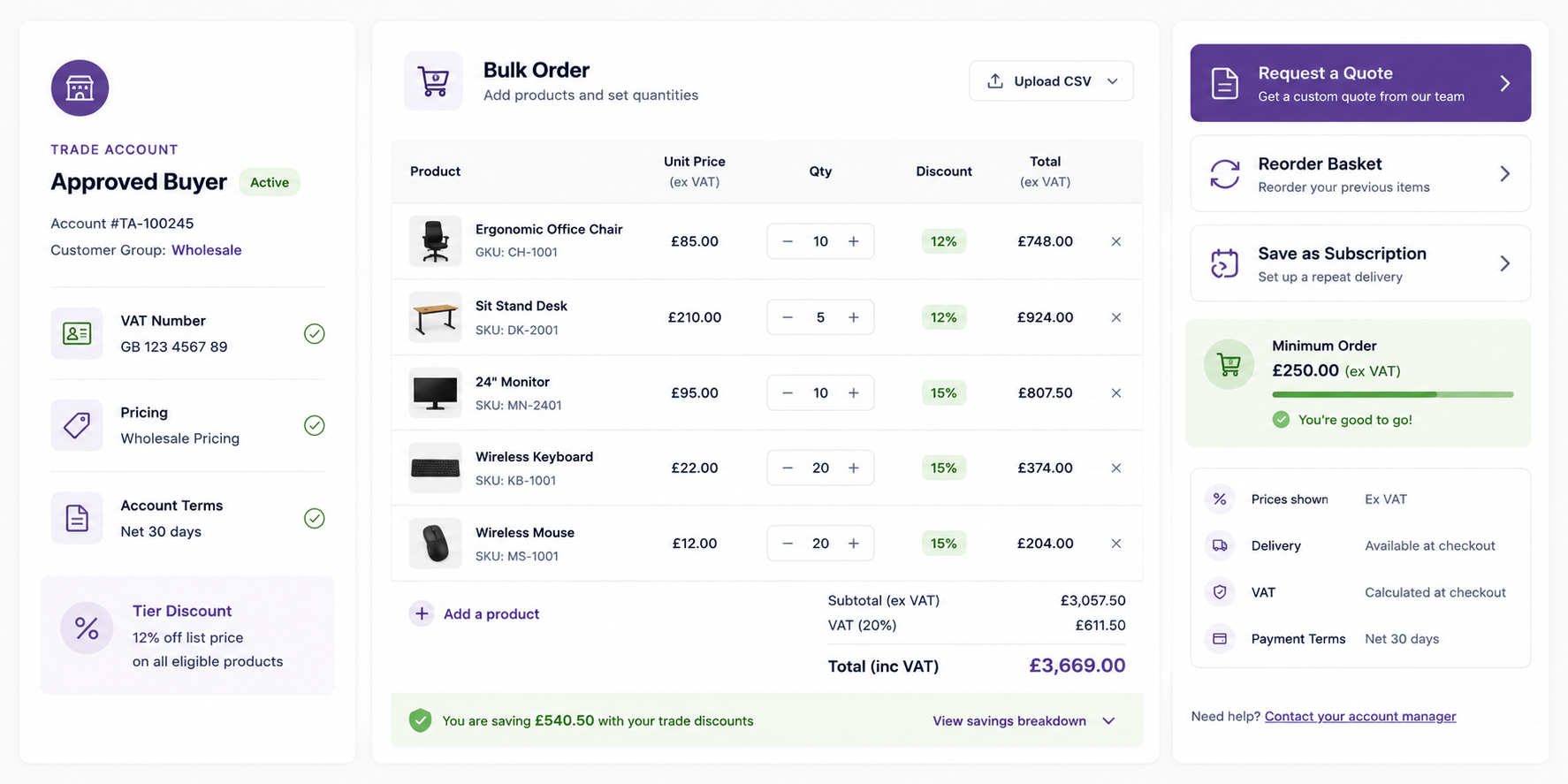
B2B stores often need trade pricing, bulk ordering, subscriptions, VAT handling and quote request tools.
It is also strong for subscriptions, memberships, deposits, bookings, digital products and any store where the buying journey is not a standard add-to-cart process. Shopify can support many of these features too, but it often depends heavily on third-party apps or higher-tier plans.
The more your store relies on custom logic, content, integrations or unusual buyer journeys, the more important it becomes to choose a platform that supports those needs rather than blocking them.
Migration and Switching Risk
Switching platforms later is possible, but it is rarely painless. Expect to migrate products, customers, orders, images, categories, metadata and, hardest of all, URL structures without damaging your SEO.
Both platforms have official and third-party migration tools, and you can usually move most store data across. The bigger risk is rebuilding everything that is not a database row: theme customisations, app configurations, email flows, analytics, tracking, checkout logic, redirects and integrations.
If your store already gets organic traffic, migration planning becomes even more important. Product URLs, category URLs, blog posts, metadata, redirects, schema, internal links, Google Analytics, Google Search Console and conversion tracking all need to be handled carefully.
Treat migration as a serious project, not a quick export and import. The wrong platform choice can be fixed later, but it is almost always cheaper to make the right decision before investing heavily in design and development.
Common Mistakes When Choosing an Ecommerce Platform
- Optimising for launch day, not year three. Shopify’s ease can mask costs and constraints that matter more as the store grows. WooCommerce’s flexibility is wasted if you do not have the resources to use it properly.
- Underestimating total cost of ownership. With WooCommerce, add up hosting, plugins, developer time and maintenance, not just the free plugin. With Shopify, add apps, transaction fees, themes and any specialist development.
- Ignoring your team’s actual skills. A platform your team cannot confidently run is a liability, regardless of its technical strengths.
- Choosing based on a single feature. One app, plugin or payment option rarely outweighs the platform’s overall fit.
- Assuming you can migrate later without consequence. Migration is possible, but it can be costly and risky if SEO, tracking and integrations are not planned properly.
- Overlooking Shopify transaction fees. Third-party transaction fees can become meaningful once monthly revenue increases.
- Forgetting content and SEO. If organic search is central to your growth, your platform needs to support more than product pages.
Worked Example: A UK-Based Retailer
Picture a Canterbury-based homeware shop expanding online. It is a three-person team: the founder, a part-time marketer and a warehouse assistant. No one codes. They expect around 200 orders a month in year one, mostly from UK customers, with ambitions to grow into Europe.
Shopify is the obvious call. A suitable Shopify plan plus Shopify Payments covers hosting, security and checkout in one managed platform. Setup is faster, the theme can look professional quickly, and the team can spend its time on photography, social media, email marketing, stock and customer service rather than server logs.
Now imagine the same shop two years later, with a thriving blog driving organic traffic, 2,000 orders a month, wholesale customers, custom bundle pricing and account-based discounts. At that point, WooCommerce on managed hosting, with a developer or agency on retainer, may start to look more attractive. Content marketing plays to WordPress’s strengths, the custom features are easier to shape around the business, and avoiding extra platform transaction fees can become more meaningful.
The right answer in the Shopify vs WooCommerce debate depends on how your business sells today and what it is likely to need next.
How Webpop Design Helps Clients Choose
At Webpop Design, we look at the platform decision before the design work starts, because the wrong ecommerce platform can create expensive problems later. A store that looks simple on the surface may need trade pricing, product filtering, subscriptions, custom shipping rules, CRM integration, payment gateway logic, content-led SEO or a migration plan that protects existing rankings.
For example, our Cygnus Instruments project involved WooCommerce integration, Stripe payments, a distributor portal, warranty tools and a custom quotation system.
None of those requirements fit a standard add-to-cart model. The distributor portal needed role-based access for different account types, the quotation system had to handle enquiries that do not run through a normal checkout, and the warranty tools had to sit against product data rather than alongside it.
That is the point at which platform choice stops being about themes and pricing and starts being about whether the system can be shaped around how the business actually operates. A conventional hosted setup would have meant working around those constraints, whereas WooCommerce let us build directly for them.
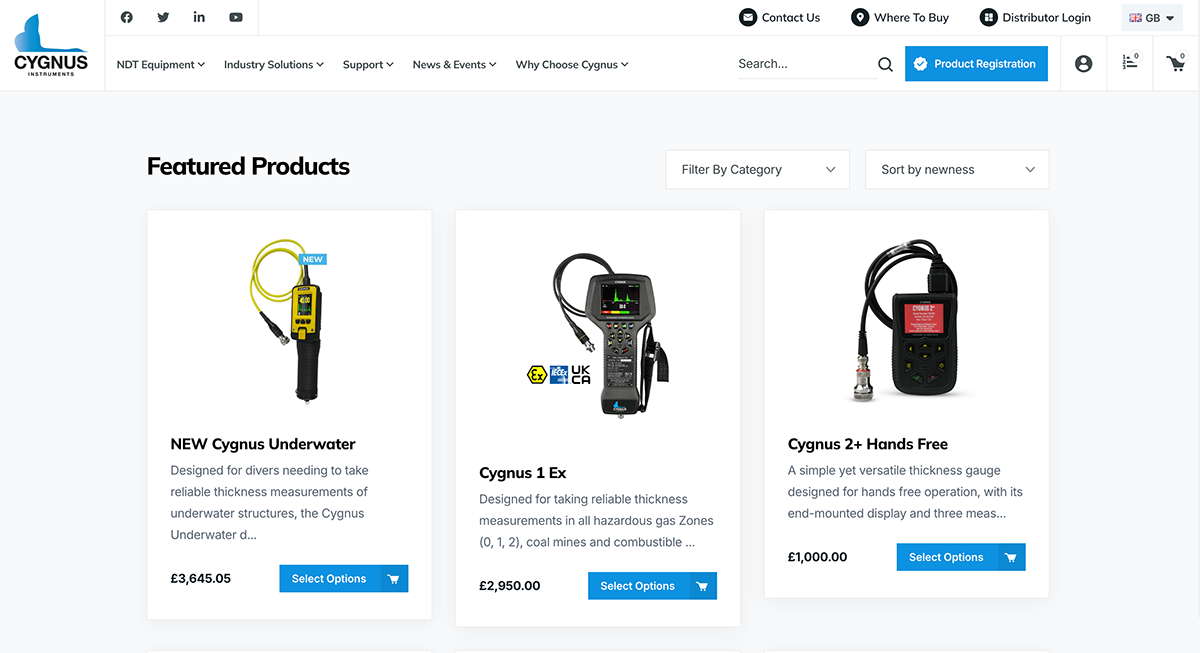
Cygnus Instruments WooCommerce shop with distributor portal navigation.
We work with WordPress, WooCommerce and Shopify, so the advice does not need to be forced in one direction. For some businesses, Shopify is the cleaner choice because it removes technical responsibility and gives the team a stable, managed ecommerce setup. For others, WooCommerce is the better route because the site needs deeper content control, bespoke functionality, flexible checkout journeys or long-term ownership.
If you are already comparing WooCommerce vs Shopify, it is worth making that decision before you spend money on design, development, apps or plugins. A short planning conversation can save a much larger rebuild later.
Checklist: Choosing the Right Ecommerce Platform
- How technical is your team, realistically, not aspirationally?
- What is your all-in monthly budget, including hosting, apps, plugins, support and fees?
- How important are content marketing and organic search to your growth plan?
- Do you need unusual product types, checkout flows, subscriptions, trade accounts or integrations?
- What transaction volume are you forecasting in 12 and 24 months?
- Who handles updates, backups, testing and security if something breaks?
- Are you selling UK-only, into the EU, or globally, and how will VAT work?
- How dependent will the store be on third-party apps or plugins?
- Do you already have WordPress content, rankings or landing pages worth preserving?
- What is your plan if the platform no longer fits in two years?
Final Recommendation: Which Is Better for Your Business?
Solo founder or side project: Shopify. The time saved on setup and maintenance is usually worth more than the subscription fee, especially when you are juggling everything else that comes with launching a new venture.
Small content-led brand with a blog and shop: WooCommerce. If you are already investing in content, WordPress gives you a stronger foundation for landing pages, guides, articles and long-tail organic search.
Growing retailer making £10k–£100k/month: Either can work. Choose Shopify if you want to focus on products, marketing and operations. Choose WooCommerce if you have development support and need more control over content, checkout, costs or custom functionality.
B2B, wholesale, subscriptions or unusual checkout: WooCommerce usually has the advantage, thanks to its flexible plugin ecosystem and developer-friendly structure.
High-volume or enterprise ecommerce: Shopify Plus can be the better choice for operational simplicity at scale. A well-architected WooCommerce setup can also work well if you have the technical team and want full ownership.
Shopify is excellent when you want a managed ecommerce platform that lets you sell quickly. WooCommerce is stronger when your ecommerce website needs to be more flexible, more content-led, more SEO-controlled or more bespoke.
If you are planning a new ecommerce website, a platform migration, or a rebuild of an existing WooCommerce website or Shopify store, Webpop Design can help you make the right call before you commit to the wrong setup. Give us a ring on 020 7998 3935 for a straightforward conversation, or send the details through our project planner and we will come back with honest advice on the best path forward.
Frequently Asked Questions
Is Shopify or WooCommerce better for SEO?
WooCommerce has the edge for content-led ecommerce SEO because it runs on WordPress and gives you deeper control over URLs, landing pages, schema, internal linking and on-page optimisation. Shopify is still SEO-friendly and covers the essentials well, so for many stores the difference is not dramatic. The gap matters most when organic search, buying guides, blog content and category landing pages are central to your growth plan.
What does each platform really cost?
Shopify has a monthly subscription cost, plus possible costs for apps, premium themes, development work and third-party transaction fees if you do not use Shopify Payments. WooCommerce is free as software, but a realistic setup needs hosting, a domain, security, backups, plugins, maintenance and often developer support. Shopify is usually more predictable. WooCommerce can be cheaper or more expensive depending on how the store is built and maintained.
Which platform offers better long-term growth?
Both platforms can scale. Shopify gives you a simpler growth path through managed hosting, apps, higher plans and Shopify Plus. WooCommerce scales through better hosting, optimisation and custom development, giving you more flexibility but more responsibility. Choose based on how much control you need and how much technical support your business has.
How do payment gateways and transaction fees compare?
Both platforms support major UK payment gateways, including Stripe, PayPal, Worldpay, Klarna, Apple Pay and Google Pay. Shopify applies extra third-party transaction fees if you use an external payment provider instead of Shopify Payments. WooCommerce does not add its own extra transaction fee, so you only pay the gateway or payment provider.
Can I switch from WooCommerce to Shopify or Shopify to WooCommerce later?
Yes, but it should be treated as a proper migration project. Products, customers and orders can usually be moved, but themes, apps, plugins, custom functionality, checkout logic, redirects, analytics and SEO settings often need rebuilding. If the existing store ranks in Google, URL mapping and redirects need careful planning.
Do I need a developer to run a WooCommerce store?
You do not need a developer to launch a very basic WooCommerce store, especially if you are comfortable with WordPress. Most serious WooCommerce stores benefit from developer help as they grow, whether for performance, plugin conflicts, custom features, checkout changes, security, maintenance or integrations.
Is Shopify better for beginners?
For most people, yes. Shopify is easier to set up, easier to manage and less technical day to day. It is a strong choice for first-time store owners, small teams and product-led retailers that want to start selling without managing hosting, updates or security.
Is WooCommerce better for an existing WordPress website?
In most cases, yes. If your business already has a WordPress website with useful content, rankings, blog posts or landing pages, WooCommerce lets you add ecommerce without moving to a separate platform. It can be the cleaner option when content, SEO and ecommerce need to work together.
Can Webpop Design help us choose between WooCommerce and Shopify?
Yes. Webpop Design can help you compare WooCommerce and Shopify based on your products, content strategy, budget, integrations, payment requirements, SEO plans and internal resources. We can also help with ecommerce website design, WooCommerce development, Shopify design, platform migrations and rebuilds.
If you’d like to talk it through, give us a ring on 020 7998 3935. Prefer to share the details in writing? You can sketch out your project on our project planner and we’ll come back to you with honest advice on the best path forward.