
 Webpop Design Marketing Team
Your website should help people take action, not make them work for it. If you want to increase conversions on your website, every slow page, unclear call to action, confusing layout and awkward form matters. These issues may look small in isolation, but together they create friction, reduce trust and stop visitors from becoming enquiries, customers or leads.
Most businesses do not need more traffic before fixing their website. They need to convert more of the visitors they already have. A high-performing website makes the next step obvious, whether that means buying a product, booking a call, submitting an enquiry, signing up or requesting a quote.
This guide gives you 101 practical website fixes designed to improve conversion rates. It covers speed, mobile usability, navigation, CTAs, forms, trust signals, content, SEO, ecommerce features and functionality and analytics. Some fixes are quick wins. Others may point to deeper design, development or content issues that need a more structured approach.
Start with the sections that match the biggest problems on your own website. If users are dropping off before they enquire, buy or book, the issue is usually not one single thing. In our experience it is more often a combination of clarity, trust, speed, usability and the way the journey is structured.
Key Takeaways for Improving Website Conversions
- Friction kills conversions – Slow speeds, unclear CTAs, confusing layouts and clunky forms stop users from taking action.
- Focus on existing traffic – More visitors are not always the answer. Often, the bigger opportunity is converting the traffic you already have.
- Every section is practical – From performance and trust to SEO, mobile usability and checkout, each fix is designed to improve the user journey.
- Small changes can make a real difference – Clearer copy, faster pages and better forms can improve enquiries, sales, sign-ups and bookings.
- This guide gives you a clear roadmap – Use it to spot quick wins, prioritise bigger improvements or decide when a full redesign makes more sense.
Speed & Performance Fixes
A slow website drives visitors away before they even see what you offer. If your pages take too long to load, users will not wait – they’ll leave and find a faster competitor. Page speed is part of how Google ranks pages, so a slow site can be harder for people to find in the first place.
Page speed optimisation does more than shave seconds off a load time; it keeps people engaged long enough to act. Faster pages improve user experience, build trust, and make it easier for visitors to complete actions. Whether it is buying a product, signing up for a newsletter, or filling out a form, speed directly impacts success.
Every second matters. According to Fast Company, Amazon calculated that a one-second delay in site speed could cost up to $1.6 billion (£1.25 billion) in sales per year. Even for smaller businesses, slow load times can significantly reduce conversions, drive potential customers away, and impact long-term revenue growth.
These fixes will help reduce load times and keep visitors on your site.
1
Compress Images before Uploading
Large images slow down your website, making users wait longer for pages to load. If a page takes too long, visitors leave before they even see your offer, leading to higher bounce rates and fewer conversions. Faster-loading images keep visitors engaged and improve the chances of them taking action.
Compressed images also help mobile users, who often browse on slower connections. If your site loads quickly on all devices, users are more likely to stay, explore, and convert. Simple adjustments like using WebP format or compression tools (TinyPNG, ImageOptim) ensure quality visuals without slowing your site down.
2
Enable Browser Caching
Every time a visitor loads your site, their browser downloads all files-images, stylesheets, scripts. Without caching, this happens on every visit, slowing everything down and creating unnecessary delays. Browser caching stores static files locally, reducing load times when users return.
A faster site means visitors can interact with your content immediately. If they do not have to wait, they are more likely to browse, engage, and complete purchases or sign-ups. Caching mainly benefits returning visitors, and it keeps conversion rates steady by stopping people bouncing on slow repeat loads.
3
Minimise CSS and JavaScript Files
Bloated CSS and JavaScript files slow down your site by increasing the time it takes to render pages. Every unnecessary script or line of code adds extra processing time, frustrating users and driving them away before they convert.
By minifying and combining these files, you speed up loading times and make interactions smoother. That reduces drop-offs at key conversion points, such as checkout pages or lead forms. Faster sites feel more professional and trustworthy, which keeps users engaged.
4
Use a Content Delivery Network (CDN)
Without a CDN, every user loads your site from a single server location. If that server is far from them, they experience delays. A CDN distributes your site’s files across multiple global servers, ensuring users load content from the nearest location. This reduces load times and improves site speed, especially for international visitors.
A faster site keeps visitors engaged longer and increases the chances of conversion. If users do not experience lag, they are more likely to complete purchases, fill out forms, or explore more content. A CDN also improves reliability, preventing downtime that could otherwise cost you sales.
5
Choose Fast, Reliable Hosting
Your hosting provider directly affects your website’s speed and uptime. Cheap, shared hosting struggles with high traffic, leading to slow load times and site crashes-both of which kill conversions. If users land on a sluggish page or encounter errors, they will not wait; they’ll leave.
Upgrading to a high-performance hosting provider (like managed WordPress hosting or a VPS) ensures your site runs smoothly, even under heavy traffic. Good hosting underpins everything else on this list. If the server is slow or unstable, no amount of clever design or copy will turn visitors into customers.
6
Remove Unused Plugins and Scripts
Every unnecessary plugin or script adds extra weight to your website, slowing down load times and increasing the risk of conflicts or errors. A slow, cluttered website creates friction, making users less likely to complete purchases, fill out forms, or engage with your content.
Streamlining your site improves page speed, reduces distractions, and keeps navigation smooth-all of which help keep visitors moving toward an enquiry or sale. If your checkout page, lead form, or call-to-action loads instantly without lag, users are more likely to complete the process rather than abandon it out of frustration.
7
Improve Core Web Vitals
Google’s Core Web Vitals measure how fast, stable and responsive your website feels to real users. Slow load times, layout shifts and delayed interactions create frustration at exactly the point where visitors should be reading, enquiring or buying.
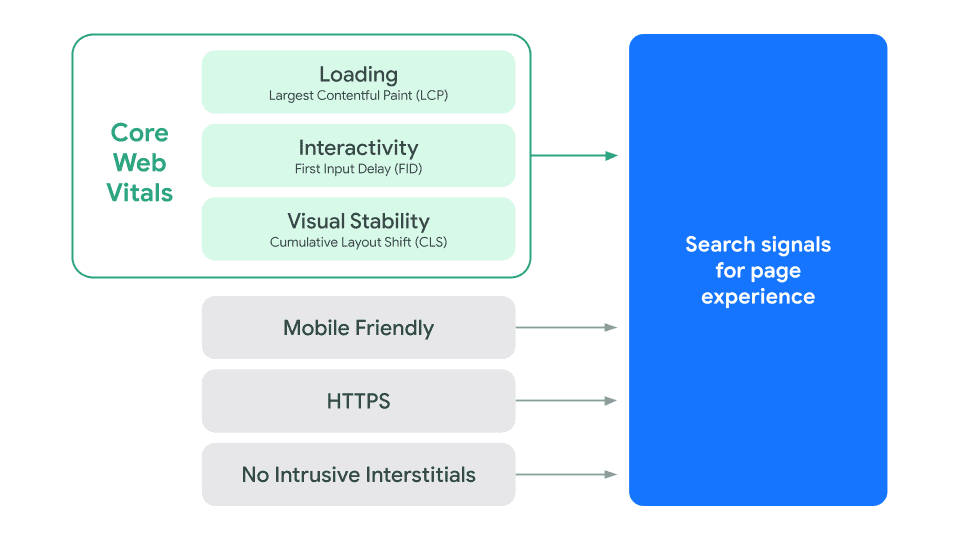
Since 2020, Core Web Vitals have been a ranking factor. – Source: Google
Improving Largest Contentful Paint (LCP), Interaction to Next Paint (INP) and Cumulative Layout Shift (CLS) helps your site load quickly, respond smoothly and stay visually stable. That makes it easier for visitors to complete purchases, sign-ups and enquiries without being interrupted by technical friction.
8
Enable Lazy Loading for Images and Videos
Without lazy loading, every image and video on your page loads at once, even those that are not immediately visible. This significantly slows down your site, increasing bounce rates and reducing engagement-both of which hurt conversions.
Lazy loading means only the images and videos in view load first, improving performance and keeping users focused on key actions like clicking “Buy Now” or submitting a form. Cloudflare explains that lazy loading reduces bandwidth usage and speeds up page load times, creating a smoother experience that keeps visitors engaged and more likely to convert.
9
Optimise Database Regularly
Over time, your database accumulates unnecessary data-post revisions, spam comments, expired transients, and unused plugin tables. This increases query load, slowing down page speed and making critical actions like loading product pages or processing payments take longer.
Regular database optimisation keeps things running smoothly and reduces load times on key conversion pages. When users can browse products, view pricing, and complete checkouts without lag, they are more likely to follow through. A well-maintained database also helps prevent the crashes that can directly cost you sales.
10
Implement Asynchronous Loading for Scripts
Scripts like tracking codes, analytics, and third-party widgets often load before the main content, delaying key conversion elements like product pages, pricing sections, or checkout forms. If users have to wait, they may leave before even seeing your offer.
Asynchronous (async) and deferred (defer) loading allow scripts to load without blocking the main content. This means conversion-critical elements-like call-to-action buttons, lead forms, and checkout pages-appear straight away, keeping users engaged and reducing abandonment.
Mobile Optimisation
Most visitors browse on their phones. If your website is not built for mobile users, you are losing conversions. A slow, hard-to-navigate site frustrates users, leading to high bounce rates and fewer sales.
Google also indexes and ranks the mobile version of your site first. If it does not work well on smaller screens, your rankings will suffer, making it harder for people to find you.
Mobile users expect instant access, clear navigation, and easy interaction. If they have to zoom in, scroll endlessly, or wait for slow pages, they’ll give up.
A smooth mobile experience keeps visitors engaged and makes it easier for them to take action. These fixes will help you turn mobile traffic into conversions.
11
Use Responsive Design
A website that does not adapt to different screen sizes loses conversions. Mobile users expect a smooth experience, whether they are on a smartphone or tablet. If they have to zoom, scroll sideways, or wrestle with broken layouts, they’ll leave and rarely come back.
Responsive website design can help ensure that your pages, buttons, and content adjust automatically to any device. A mobile-friendly experience keeps users engaged, making them more likely to complete purchases, submit enquiries, or sign up for services. A non-responsive site quietly drives potential customers away.
12
Ensure Buttons Are Large Enough to Tap
Small buttons make it difficult for mobile users to complete actions. If they struggle to tap a purchase button or fill out a form, frustration sets in, increasing drop-offs and reducing conversions.
Call-to-action buttons like “Buy Now,” “Get a Quote,” and “Sign Up” must be easy to tap without zooming in. As a rule of thumb, buttons should be at least 48×48 pixels and spaced out to prevent accidental clicks. A clear, touch-friendly interface guides users smoothly through the conversion process.
13
Remove Pop-Ups That Disrupt the Mobile Experience
Pop-ups that cover the screen or are difficult to close frustrate mobile users. If visitors cannot reach the content they came for, they’ll bounce before converting. Google also penalises intrusive interstitials on mobile, which can hurt search rankings and reduce organic traffic.
If pop-ups are necessary, keep them small, easy to close, and timed for the right moment, such as when a user is about to exit. Non-intrusive lead capture methods, like sticky banners or slide-ins, can drive sign-ups without ruining the experience.
14
Use a Mobile-Friendly Font Size
Tiny text forces users to pinch and zoom, making content harder to read. If users struggle to scan your headlines, pricing details, or call-to-action buttons, they are less likely to engage or convert.
Accessible Web states that font sizes below 16px can negatively affect readability and accessibility, making it harder for users to interact with content effectively. Readable text helps users absorb information quickly, reducing friction and increasing the chance they follow through with a purchase or enquiry.
15
Test Across Different Mobile Devices
Assuming your site works perfectly on every device is a costly mistake. A page that loads well on an iPhone may break on an Android. If users hit broken layouts, slow load times, or missing elements, they will not stay to complete a transaction.
Regularly testing your website across devices and screen sizes catches conversion-killing issues before they cost you sales. Use Chrome DevTools Device Mode for in-browser checks, then confirm on real handsets, since emulators do not always reveal touch and performance problems. A site that holds up across mobile platforms keeps users engaged.
16
Optimise Images for Mobile
Large, unoptimised images slow down mobile load times, causing visitors to abandon your site before they even see your offer. Mobile users expect fast, smooth browsing-if they have to wait for oversized images to load, they’ll take their business elsewhere.
Compressing images, using next-gen formats like WebP, and setting proper dimensions ensure fast loading without sacrificing quality. A site that loads quickly keeps users engaged and improves the chances of them completing a purchase, signing up, or taking another desired action.
17
Reduce Heavy Animations
Animations add visual appeal, but too many slow down performance and disrupt the experience. Mobile devices, especially older ones, struggle with resource-heavy animations, causing lag, delayed interactions, and higher bounce rates.
Simplifying or removing non-essential animations speeds up the site and lets visitors navigate smoothly. Subtle, lightweight effects can still add polish without interfering with conversions. The priority should always be a fast, predictable journey.
18
Ensure Mobile Navigation Is Easy to Use
A confusing mobile menu kills conversions. If users cannot quickly find what they are looking for-whether it is product categories, pricing, or a contact page-they’ll leave instead of exploring further.
A streamlined mobile menu should be clear, collapsible (hamburger menu), and easy to tap. Key pages like “Shop,” “Contact,” “Pricing,” and “Sign Up” should sit within one or two taps. The faster users can reach critical conversion pages, the more likely they are to take action.
19
Enable Accelerated Mobile Pages (AMP) if Needed
Speed is everything for mobile conversions. Accelerated Mobile Pages (AMP) strip down unnecessary elements so pages load almost instantly on mobile. Faster pages reduce bounce rates, keeping visitors engaged long enough to convert.
AMP works best for blogs, landing pages, and news content where fast delivery matters most. For ecommerce and interactive sites it is often unnecessary, and these days well-optimised standard pages frequently match AMP for speed, so test its impact before committing.
20
Check for Mobile Usability Issues in Google Search Console
Even if your site looks fine on mobile, hidden issues can be blocking conversions. Google Search Console flags problems like content overflowing the screen, clickable elements being too close together, or text being unreadable-any of which can frustrate users and reduce engagement.
Regularly checking for and fixing these issues keeps your site in line with Google’s mobile-friendly standards. A frustration-free mobile experience keeps visitors on-site longer, increasing the likelihood of them completing purchases, submitting enquiries, or engaging with your content.
Navigation & Usability
Visitors will not convert if they cannot find what they need. Confusing menus, cluttered layouts, and broken links create frustration. When users struggle to navigate, they leave.
Good navigation guides visitors smoothly. It helps them find information quickly, whether they are looking for a product, service, or contact details. A clear, intuitive layout builds trust and keeps people engaged.
Usability goes beyond menus. Every interaction should feel effortless. Buttons should be easy to click, forms should be simple to complete, and important pages should be within reach.
The easier it is for visitors to explore your site, the more likely they are to convert. These fixes will remove friction and improve the experience.
21
Simplify the Menu Structure
A cluttered, confusing menu overwhelms visitors and makes it harder for them to find what they need. If users have to think too much about where to go next, they are more likely to leave before converting.
A well-organised WordPress web design keeps menus simple, intuitive, and conversion-focused. Grouping similar pages under clear categories and keeping the number of menu options low helps visitors navigate without effort. Prioritising links like “Shop,” “Pricing,” “Contact,” and “Get a Quote” reduces friction and keeps users moving toward action.
22
Use Clear, Logical Page Hierarchy
A disorganised website structure leads to frustration. If users cannot follow a clear path to the information they need, they’ll abandon the site instead of moving toward conversion.
A well-structured hierarchy puts important pages such as product pages, service descriptions, and lead forms within a few clicks. Categories should flow logically, guiding users toward their goal. A clear structure also helps search engines understand your content, improving SEO and bringing in more qualified visitors.
23
Ensure All Links Work
Broken links disrupt the experience and make your website look unprofessional. If a visitor clicks a call-to-action or product link and lands on a 404 page, their trust drops, and they are less likely to complete a purchase or sign-up.
Regularly checking and fixing broken links keeps navigation smooth. Tools like Screaming Frog SEO Spider or Google Search Console help you catch issues before they cost you conversions. A clean browsing experience keeps users engaged and increases the chances of them following through.
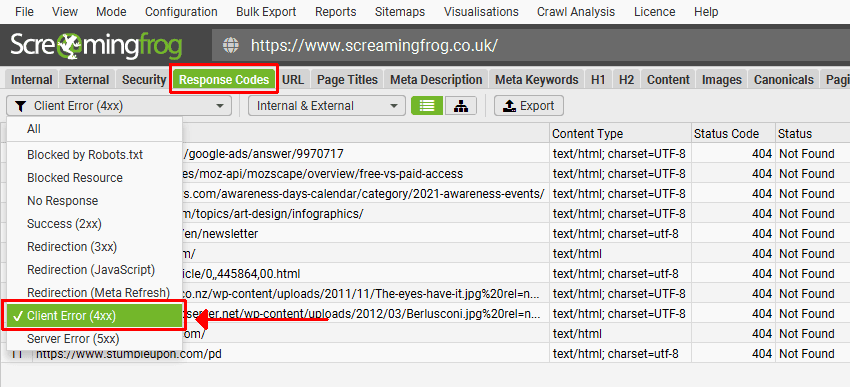
Image Source: Screaming Frog
24
Include a Search Bar
Visitors looking for a specific product or piece of information do not want to dig through menus-they want instant results. A missing or poorly designed search bar forces users to browse manually, increasing frustration and bounce rates.
A well-placed search bar, ideally at the top of the page, helps users find what they need straight away. For ecommerce sites, predictive search with autocomplete suggestions speeds up product discovery. The faster visitors find what they want, the more likely they are to convert.
25
Use Sticky Navigation
If users have to scroll back up to find the menu or a call-to-action, many will not bother. Sticky navigation keeps the most important elements-like menus, checkout buttons, and lead forms-visible at all times.
Keeping navigation within reach lets users move through the site with less effort. For ecommerce sites, a sticky “Buy Now” or “Add to Cart” button means users never have to hunt for the next step. The easier it is to take action, the higher the conversion rate.
26
Highlight Active Menu Items
When users navigate your site, they need to know where they are. If the active menu item is not highlighted, they may lose their bearings, leading to frustration and drop-offs.
A clearly highlighted active menu item reassures users and helps them move through the site with confidence. This matters most on ecommerce sites, service pages, and checkout flows. When users can track their location easily, they are more likely to complete the journey.
27
Limit the Number of Menu Options
A cluttered menu overwhelms users with too many choices. When visitors face too many options, decision fatigue sets in, and they are less likely to take any action at all.
Keeping the menu focused on key pages such as “Shop,” “Pricing,” “Contact,” and “Get a Quote” streamlines navigation. Fewer distractions mean users find what they need quickly, which reduces friction and improves the chance of a sale or enquiry.
28
Remove Unnecessary Dropdowns
Dropdown menus may seem useful, but they often make navigation more complicated. They add clicks, can be fiddly on mobile, and hide important pages instead of surfacing them.
Reducing dropdowns improves usability and keeps key pages easy to reach. Where dropdowns are genuinely needed, keeping them minimal and well-organised helps users move smoothly through the site.
29
Ensure the Homepage Links to Key Pages
Your homepage is the gateway to your website. If it does not link clearly to conversion-focused pages like product categories, pricing, or lead capture forms, users may not know where to go next.
A well-structured homepage guides visitors toward the most important areas of your site. Strategic internal linking to service pages, testimonials, and CTAs keeps users engaged and improves the likelihood of them taking action. The easier it is to navigate from the homepage, the higher the conversion rate.
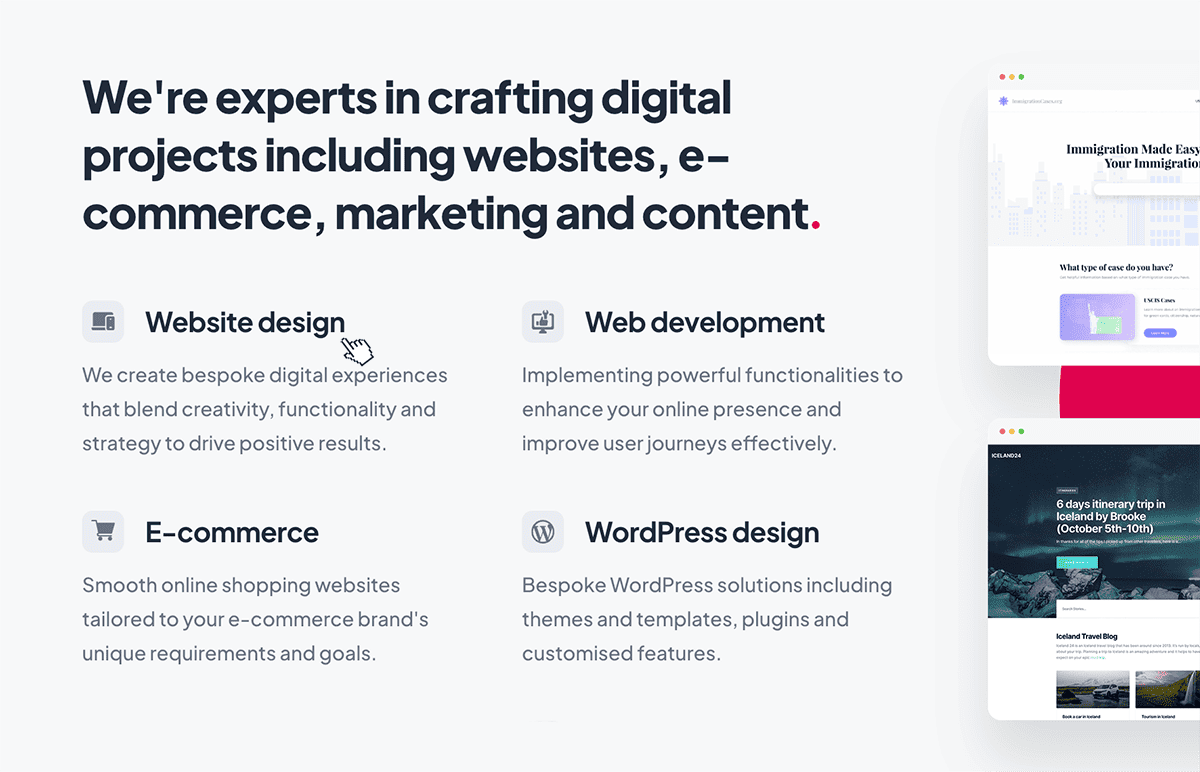
Linking key pages from the homepage helps to increase conversions on your website.
30
Use Breadcrumbs for Easy Navigation
Breadcrumbs show users where they are within your site’s hierarchy. Without them, visitors can lose their place, especially on large ecommerce sites or content-heavy websites.
Breadcrumbs improve the experience by letting visitors backtrack without using the browser’s back button. They also reinforce trust by giving a clear sense of structure, which keeps users engaged and reduces abandonment. Search engines favour well-structured breadcrumb navigation too, helping your pages rank and attract more qualified traffic.
Call-to-Action (CTA) Improvements
Visitors rarely take action unless the next step is obvious. A weak or unclear call-to-action (CTA) leads to hesitation, confusion, and lost conversions.
Your CTA should be obvious, compelling, and easy to follow. It needs to stand out visually, use clear language, and give people a reason to act now. If users do not notice it or do not understand what happens when they click, they’ll ignore it.
Placement matters. A CTA buried at the bottom of a page or surrounded by distractions will not perform. The best CTAs sit where users naturally look, guiding them to the next step without forcing them to search.
Small changes to CTA design, wording, and placement can have a big impact. These fixes will help you turn passive visitors into active customers.
31
Make CTA Buttons Clear and Prominent
If visitors cannot easily spot your call-to-action, they will not take action. A weak or hidden CTA lowers engagement and reduces conversions. Users should never have to hunt for the next step-whether that is making a purchase, signing up for a service, or requesting a quote.
Your CTA should be large enough to stand out, positioned in key areas, and visually distinct from everything around it. A strong, visible CTA makes it easy for users to take the next step without hesitation.
32
Use High-Contrast Colours for Buttons
If your CTA blends in with the page, visitors will overlook it. A CTA button should grab attention and pull users toward the action you want them to take.
A high-contrast colour helps your CTA stand out. If your site has a neutral or minimal design, a bold button colour like red, orange, or green makes the action clear. The aim is a button that is hard to miss but still sits comfortably within the layout. Test contrast against your own palette, since the right colour depends on the page around it.
33
Keep CTA Text Action-Oriented
Vague or passive CTA text weakens conversions. Visitors need to know what happens when they click. Generic text like “Submit” or “Learn More” creates no urgency and communicates no value.
Action-oriented CTAs like “Get My Free Quote,” “Start Your Trial,” or “Buy Now & Save” make the next step clear. Strong action words guide users toward conversion. The more specific the promise, the more effective the button.
34
Remove Distractions around CTAs
A cluttered page with multiple competing elements weakens the impact of your CTA. If visitors are overwhelmed with choices, they may abandon the page instead of converting.
Removing distractions such as unnecessary links, excessive text, or competing buttons keeps users focused on the one action that matters. A clean, simple design directs attention to the CTA and makes it easier for visitors to follow through.
35
Test Different CTA Placements
Placement plays a huge role in whether visitors click your CTA. Buried at the bottom of the page, or positioned where users do not naturally look, it will be ignored.
Testing placement helps you find the locations that actually drive conversions. Some pages benefit from a CTA above the fold, while others perform better with CTAs repeated through the content. Heatmaps and A/B testing show where users engage most, so you can position CTAs for maximum impact.
36
Use Urgency (e.g., “Limited Time Offer”)
A CTA without urgency gives users no reason to act now. If they think they can return later for the same deal, they’ll delay-and often never come back. A genuine sense of urgency encourages immediate action.
Phrases like “Limited Time Offer,” “Only X Spots Left,” or “Sale Ends Soon” prompt users to act before they miss out. Countdown timers on sales pages or time-limited discounts reinforce that urgency. Keep it honest, though-fake scarcity erodes trust fast.
37
Ensure CTAs Appear Above the Fold
If users have to scroll to find your CTA, many will not bother. A CTA placed above the fold (visible without scrolling) means visitors see it immediately. This matters most on mobile, where long pages can bury CTAs out of sight.
The first few seconds on a page decide whether a visitor stays or leaves. A CTA near the top captures attention early and makes the next step obvious from the start.
38
Optimise CTA Size for Visibility
A CTA button that is too small gets ignored. One that is too large can look clumsy and disrupt readability. Finding the right balance is key.
Your CTA should be large enough to stand out but not overpower the rest of the page. On mobile, it should be big enough to tap easily without zooming. A well-sized CTA makes sure users do not miss their chance to engage, on desktop or mobile.
39
Make CTA Buttons Look Clickable
A CTA that does not look like a button will not get clicked. If users are not sure what is interactive, they’ll hesitate or skip past key actions.
CTAs should use clear visual cues-contrasting colours, subtle shadows, or hover effects-to signal they are clickable. Rounded edges and arrow icons also help buttons stand out. The aim is to leave no doubt about where to click next.
40
Use Different CTAs for Different Pages
A one-size-fits-all CTA does not work across every page. The best CTAs match user intent-what someone needs at that specific moment. A product page CTA should focus on buying, while a blog post CTA might point to a newsletter sign-up or free trial.
Tailoring CTAs to different stages of the journey increases relevance and conversion rates. Matching CTA text and placement to the page content means visitors always see a next step that fits where they are.
Forms & Lead Generation
Forms are the bridge between visitors and conversions. Whether you are collecting leads, registrations, or sales, a poorly designed form creates resistance. Every extra field, unnecessary step, or confusing layout lowers conversion rates.
Users do not want to fill out long, complicated forms. They want quick, effortless interactions. The more friction you remove, the more leads you’ll capture.
Speed and field usability matter. Autofill, clear labels, and real-time validation make the process smoother. Trust signals, like security badges and privacy assurances, reduce hesitation.
Mobile users need even more attention-small screens make poorly designed forms harder to complete. According to Insiteful, 67% of users abandon forms due to unnecessary complexity, which shows how much streamlined design matters.
A well-optimised form can increase conversions without asking more from the user.
41
Reduce the Number of Form Fields
The more fields a form has, the more effort users have to put in. If a form looks long and complicated, many visitors abandon it before completing it. Every unnecessary field is a potential conversion killer.
Only ask for essential information. If you do not absolutely need a phone number, company name, or extra details upfront, drop them. Shorter forms reduce friction and increase submission rates, helping you capture more leads.
42
Enable Autofill and Autocomplete
Typing details out manually slows users down and adds frustration, especially on mobile. If visitors have to re-enter their name, email, and address every time, they are more likely to give up before submitting.
Autofill and autocomplete speed up completion by letting browsers suggest saved details. That makes the process effortless and improves the chance of a finished form rather than an abandoned one.
43
Use Multi-Step Forms if Necessary
Long forms feel overwhelming, but breaking them into steps makes them easier to complete. Instead of showing everything at once, a multi-step form presents one section at a time, keeping users focused.
For example, instead of displaying 10 fields on one page, split them into “Basic Info” → “Preferences” → “Final Details.” This feels more manageable and reduces drop-offs. Once users complete the first step, the small commitment they have already made makes them more likely to finish.
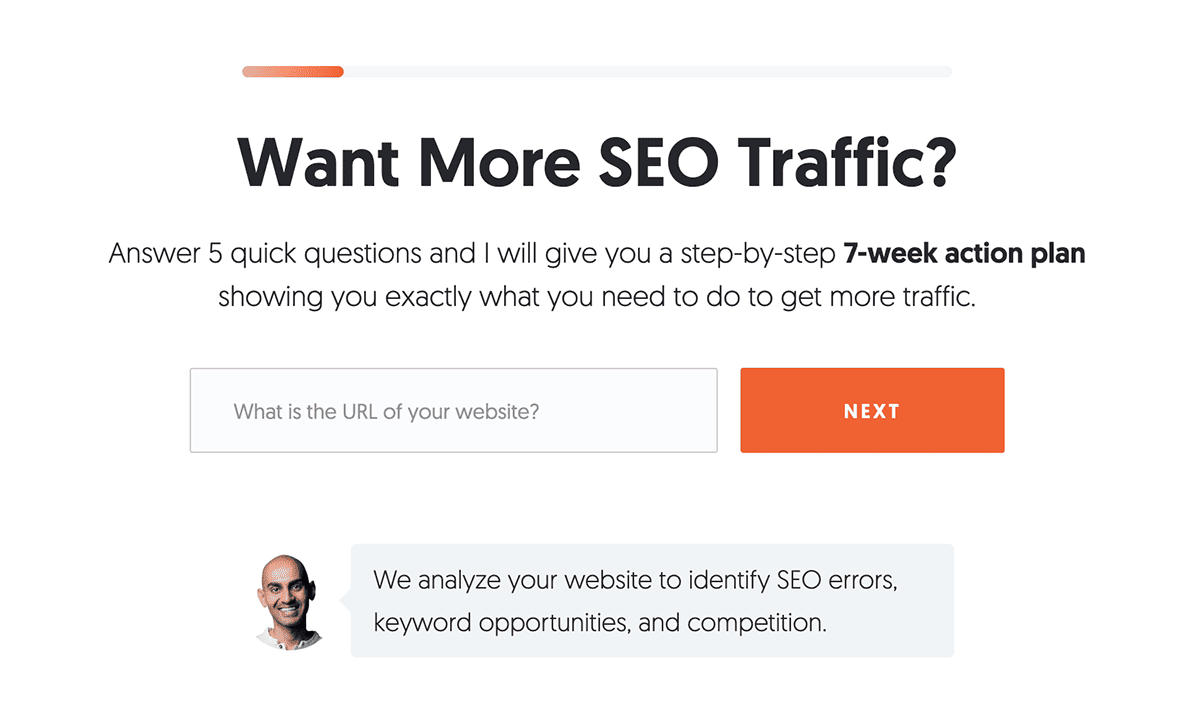
Multi-step forms reduce drop-offs and improve conversions. – Image Source: Neil Patel
44
Remove CAPTCHA Unless Essential
CAPTCHAs prevent spam but also put a barrier in front of real users. If visitors struggle with a CAPTCHA or find it annoying, they may abandon the form altogether, costing you leads.
Instead of traditional CAPTCHAs, consider invisible reCAPTCHA or honeypot fields that block bots without getting in the user’s way. Removing that friction makes it easier for genuine users to convert.
45
Test Different Form Designs
A form that looks complicated, poorly styled, or out of place will reduce submissions. If the layout is confusing or the call-to-action is unclear, visitors will not complete it.
A/B testing different form designs-field layout, button size, background contrast-shows what works best. Small changes, like adjusting the submit button colour or adding white space, can move the needle on conversion rates. Good form design helps users feel comfortable completing the process.
46
Provide Clear Error Messages
If a form does not submit, users need to know why. Vague or missing error messages frustrate visitors and push them to abandon the process instead of fixing their input.
Error messages should be clear, specific, and easy to act on. Instead of a generic “Something went wrong,” use instructions like “Please enter a valid email address” or “Your password must be at least 8 characters.” Inline validation, which shows errors as users type, helps them correct mistakes on the spot and finish the form.
47
Allow Social Logins Where Possible
Filling out forms manually takes time, especially for account creation. If users have to type their details instead of using an existing login, many drop off before converting.
Social logins (Google, Facebook, Apple) let users sign up in seconds. This reduces friction and lifts conversion rates, particularly on mobile where typing is more tedious. A one-click login keeps users engaged and improves the chance they complete the action.
48
Display Trust Signals Near Forms
Visitors hesitate to submit forms if they are unsure how their data will be used. If they doubt their information is secure, or suspect a flood of spam, they will not complete the process.
Placing trust signals near forms-privacy assurances (“We never share your data”), SSL security badges, or short testimonials-helps reassure users. When people feel safe, they are far more willing to hand over their details.
49
Offer an Incentive for Filling Out the Form
People are more willing to share their details when they get something in return. If your form simply asks for information without offering value, many users will not bother.
An incentive-a discount, free resource, consultation, or exclusive content-gives users a reason to submit. Instead of just asking for an email, you are offering a fair trade, which makes people far more likely to convert and builds your lead pipeline faster.
50
Ensure Mobile Users Can Complete Forms Easily
If a form is difficult to use on mobile, conversions will suffer. Small input fields, tiny buttons, and excessive scrolling create a frustrating experience that leads to drop-offs.
A WordPress development approach built around mobile makes forms fully responsive, fields large enough to tap, and autofill ready to go. Using mobile-friendly input types, cutting unnecessary fields, and spacing elements properly all make forms easier to complete. A smooth mobile experience removes friction and lifts conversion rates.
Trust & Credibility
People do not buy from websites they do not trust. If visitors have doubts about your business, they will not sign up, make a purchase, or share their information.
Trust is built through transparency, professionalism, and social proof. Users look for signals that show your business is legitimate-secure payment options, clear policies, real testimonials, and visible contact details. If anything feels off, they’ll leave.
A professional design plays its part too. Outdated layouts, poor-quality images, and broken links make a site feel untrustworthy. Small details, like consistent branding and error-free content, reinforce credibility.
Building trust is not about bolting on a badge or a couple of testimonials-it is about making every element of your site feel reliable and secure. These fixes will help reassure visitors and improve conversions.
51
Display Security Badges
Visitors hesitate to share personal details or payment information if they do not trust your website’s security. If they are not confident their data is safe, they’ll leave instead of completing a purchase or filling out a form.
Displaying SSL certificates, payment security badges (Visa, Mastercard, PayPal Verified), and trust seals (McAfee, Norton, Trustpilot) reassures users that your site is secure. These visual cues reduce uncertainty and help visitors feel safe enough to proceed.
52
Add Social Proof (Testimonials, Reviews)
People trust other people more than they trust businesses. If visitors do not see proof that others have had a good experience, they may hesitate before taking action.
Genuine customer testimonials, verified reviews, and case studies reinforce credibility. Placing positive feedback near CTAs or product pages builds confidence at the moment of decision. Real experiences from satisfied customers turn hesitation into trust, leading to more sign-ups, purchases, and enquiries.
53
Show Real Photos of Team Members
A faceless business feels impersonal, which makes trust harder to build. Visitors want to know who they are dealing with before committing to a purchase or service.
Authentic team photos on your About page, contact section, and service pages personalise the experience. Seeing the real people behind the brand makes visitors more comfortable engaging with your business and taking the next step.
54
Use High-Quality Images, Not Stock Photos
Generic stock photos weaken credibility. Visitors can usually tell when an image is staged, which makes a site feel less authentic. Poor-quality visuals leave a negative impression and lower trust.
Investing in custom photography, or at least high-quality, relevant images, builds confidence. If you must use stock images, choose ones that feel natural and on-brand. Real, considered visuals make your business more relatable and lift engagement.
55
Display Client Logos
If potential customers do not know who you have worked with, they may question your credibility. A website with no visible proof of past clients or partnerships feels less established, which makes visitors hesitant.
Recognisable client logos on your homepage or testimonials page add trust quickly. They show that established businesses or satisfied customers have chosen your services, which reduces doubt. The more familiar and reputable the brands, the stronger the signal.
Client logos build trust and boost conversions. – Image Source: Hedera
56
Ensure an SSL Certificate Is Active
If your website does not have an SSL certificate, visitors will see a “Not Secure” warning in their browser. That instantly damages trust and makes users think twice before submitting personal information or making a purchase.
An SSL certificate encrypts data, protecting transactions and sensitive information. It is also a ranking signal in Google, so secure sites have an edge in search. The padlock icon in the address bar reassures users that your site is safe.
57
Publish Case Studies
Visitors want proof that your business delivers results. If they cannot see real-world success stories, they may hesitate before committing to your service.
Detailed case studies build trust by showing how past clients achieved measurable results. According to HubSpot, well-structured case studies can have a real impact on credibility, engagement, and conversion rates. Walking through the challenge, the solution, and the outcome reassures potential customers and encourages them to act.
58
Add a Visible Contact Page
A business without clear contact details looks suspicious. If visitors struggle to find a way to reach you, they may assume your company is not legitimate-or simply go to a competitor who is easier to contact.
A well-structured contact page should include an email address, phone number, and contact form. Live chat or direct support links add to the reassurance. When users feel they can reach you easily, they are more comfortable making a purchase or submitting their details.
59
List Physical Location and Phone Number
Online businesses that do not display a location or phone number often look untrustworthy. Visitors may wonder whether your company is real, or whether they’ll get support after buying.
Even without a physical storefront, listing an office address, service area, or phone number shows your business is established. Local businesses benefit especially, since an address helps with local SEO and builds trust with nearby customers. A clear way to contact you makes visitors more confident in taking the next step.
60
Maintain a Blog with Valuable Content
A website with no updates looks abandoned. If visitors see stale content or no sign of recent activity, they may question whether your business is still going.
A regularly updated blog builds credibility and positions you as an authority in your field. Useful content-guides, insights, or case studies-keeps visitors engaged and improves search rankings, bringing in more qualified traffic. An active site reassures users that your business is one they can rely on.
Content Optimisation
Content is more than words on a page; it is what guides your visitors toward taking action. If your content is not clear, engaging, or relevant, users will not stick around. Poorly structured or off-target content frustrates readers and loses opportunities.
Visitors skim, so your content needs to grab attention fast. Clear headings, bullet points, and short paragraphs make information easy to digest. The more accessible your content, the more likely users are to stay and engage.
Your content should speak to the needs and problems of your audience, with a clear value proposition that makes them want to act. Relevant, well-crafted content helps users understand why they need your product or service and why they should choose you.
Optimising content is a key part of improving your website’s performance. These fixes will help your visitors get the right information at the right time.
61
Use Short, Clear Headlines
Visitors do not read-they scan. If your headlines are long-winded or unclear, users will not engage with your content, and they’ll struggle to grasp your offer or take action.
A strong headline is clear, direct, and conversion-focused. Instead of “Discover Our Wide Range of Innovative Solutions,” use “Get Faster, More Reliable Hosting Today.” Headlines should tell users immediately what they’ll get, which keeps them on the page.
62
Ensure Every Page Has a Purpose
A website full of unnecessary pages creates clutter and weakens your messaging. If visitors do not immediately understand why a page exists or how it helps them, they are more likely to leave.
Each page should have a clear goal-educating visitors, selling a product, or capturing leads. If a page does not drive conversions or move the user journey forward, rework it or remove it. A focused site keeps visitors engaged and heading toward a purchase or enquiry.
63
Keep Paragraphs Short
Large blocks of text overwhelm visitors. If users land on a page and see long, dense paragraphs, they’ll skip the content-or leave the site entirely.
Short, digestible paragraphs are easier to scan and absorb. Each one should focus on a single idea, keeping users engaged and moving toward a call to action. The easier your content is to read, the more likely visitors are to convert.
64
Use Bullet Points for Easy Reading
Dense paragraphs make it hard for visitors to find key information quickly. If they have to dig through long blocks of text, they’ll get frustrated and may leave.
Bullet points pull out important details in a scannable format. Instead of writing a paragraph about product features, list them clearly. This improves readability, helps the details stick, and makes the next step easier to find.
65
Remove Jargon
Over-complicated language makes your content harder to understand. If visitors have to stop and decode what something means, they lose interest and leave before converting.
For writing clear, user-friendly website content, the Nielsen Norman Group explains how concise, scannable text improves readability and keeps visitors engaged.
Your content should be simple, clear, and free of industry jargon. Speak to your audience in familiar terms. Instead of “leveraging scalable solutions for business growth,” say “Get a website that grows with your business.” The easier your offer is to understand, the more likely people are to convert.
66
Highlight Key Points with Bold Text
Visitors skim rather than read every word. If your key points blend into the rest of the text, they go unnoticed.
Bold text makes important information stand out. Calls to action, product benefits, and pricing should be visible without users having to search for them. When people can find what matters quickly, they stay engaged longer and are more likely to convert.
67
Use Engaging Visuals
A wall of text feels dull and heavy going. Without visuals, visitors may lose interest and leave before taking action.
Relevant images, videos, or infographics keep users engaged and reinforce key messages. Visuals should support conversions-product images, explainer videos, or before-and-after comparisons. Well-placed visuals lift engagement and make information easier to absorb.
68
Ensure Consistency in Tone
Inconsistent messaging creates confusion and weakens trust. If one page sounds formal and technical while another is casual and chatty, visitors struggle to connect with your brand.
Your website should have a consistent tone that reflects your brand and speaks to your audience. Whether your voice is authoritative, friendly, or professional, it should hold steady across every page. A clear, familiar voice builds trust and keeps users engaged.
69
Add a Compelling Value Proposition
If visitors do not understand why your product or service beats the competition, they will not convert. A weak or unclear value proposition makes it easy for them to leave.
Your value proposition should explain, straight away, the benefit of choosing you. Instead of listing features, highlight the real value-saving time, reducing costs, or getting better results. A strong, well-placed value proposition convinces visitors they are in the right place.
70
Break Up Text with Subheadings
Large blocks of text make pages harder to read. If visitors cannot scan the content, they’ll leave before reaching the important details.
Descriptive subheadings break up long content and make it easier to navigate. Each section should signal what is coming next, helping users find the information they need quickly. Well-structured content keeps visitors moving toward conversion points like sign-up forms, checkout pages, or contact sections.
SEO & Traffic Fixes
More traffic does not always mean more conversions. If the right people are not finding your site, or if search engines struggle to understand your content, you are losing potential customers. Investing in SEO services helps attract qualified visitors-people actively searching for what you offer-but that is only the first step.
SEO is not just about driving traffic; it is about bringing in the right audience and guiding them toward conversion. If your pages are not structured properly, users land on your site and leave before taking action. Poorly optimised pages, confusing navigation, or slow load times turn away leads and sales, no matter how much traffic you generate.
Search engines prioritise sites that provide a fast, useful experience. Pages that load quickly, offer clear, valuable content, and are easy to navigate tend to rank higher and hold attention longer. Good SEO makes your site visible in search and keeps the visitors it brings in engaged enough to convert.
These fixes will help improve rankings, increase traffic, and turn more visitors into customers. When SEO and user experience pull in the same direction, your site does real work for the business.
71
Use Descriptive, Keyword-Rich Titles
Your page title is the first thing users see in search results. If it is vague or missing important keywords, it will not attract clicks, and fewer clicks mean fewer conversions.
A strong title includes relevant keywords while staying clear and compelling. Instead of “Our Services”, a better title would be “Expert Web Design & SEO Services for Increased Conversions”. A well-crafted title improves rankings and encourages users to click through, which lifts your chances of turning visitors into leads or customers.
72
Optimise Meta Descriptions
A poorly written or missing meta description means lost traffic. If users do not see a compelling reason to click, they’ll choose a competitor instead.
Your meta description should be clear, engaging, and keyword-relevant, summarising the page’s value in around 155-160 characters. Instead of something generic, write one that drives action: “Boost conversions with fast, high-performing websites. Get custom web design built for results.” A well-written description lifts click-through rates and brings in more potential conversions.
73
Use Alt Text for Images
Images improve the experience, but search engines cannot “see” them. If your images lack alt text, they will not contribute to rankings, and screen reader users cannot understand them.
Descriptive, relevant alt text helps search engines index your images and improves accessibility. Instead of “image123.jpg,” use something like “Fast-loading ecommerce website design for better conversions”. Optimised images bring in organic traffic and keep users engaged.
74
Ensure URLs Are Clean and Readable
Long, messy URLs full of numbers and random characters look unprofessional and do nothing for SEO. If users do not trust or understand a link, they may hesitate to click.
A clean, keyword-friendly URL (for example, “yourwebsite.com/living-room-furniture/”) improves both search visibility and user trust. Stripping out unnecessary words and characters makes URLs easier to read and more likely to earn clicks.
75
Optimise for Featured Snippets
Ranking in Google’s featured snippets can lift visibility and drive more organic traffic. These snippets sit at the top of search results and answer a query directly, which makes them a strong opportunity for clicks. Users tend to trust the information shown there, so they are more likely to visit the source.
To win snippets, structure content with clear headings, bullet points, and concise answers to common questions. Google favours well-formatted content that answers search intent directly. Done well, this can improve rankings, build credibility, and position your site as a trusted source.
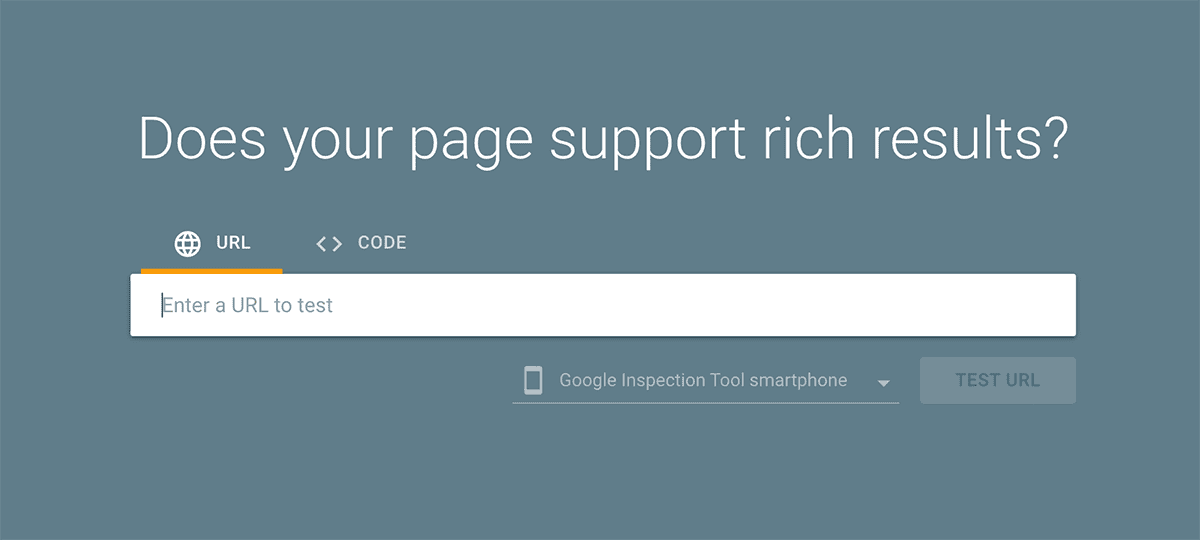
Image Source: Google
76
Submit a Sitemap to Google
If Google cannot find your pages, they will not rank, and pages that do not rank cannot bring in traffic or conversions. A sitemap acts as a roadmap for search engines, helping them crawl and index your content efficiently.
Submitting your XML sitemap to Google Search Console helps important pages-service pages, product listings, landing pages-get discovered and indexed. The faster Google indexes your site, the sooner you attract qualified traffic that is ready to convert.
77
Improve Internal Linking
A weak internal linking structure makes it harder for users and search engines to navigate your site. If visitors cannot find relevant content or related products, they are more likely to leave without converting.
Strategic internal links guide users toward conversion-focused pages like contact forms, pricing pages, or product categories. They also strengthen SEO by spreading authority across the site. We rebuild internal linking on a lot of projects, and it is often where overlooked pages start ranking and quietly bringing in enquiries.
78
Reduce Duplicate Content
Duplicate content confuses search engines and drags down rankings. If Google finds multiple versions of the same content, it may not know which to rank, which hurts your visibility.
Use canonical tags to tell search engines which version is the original. Auditing your site with tools like Siteliner or Copyscape helps you find and clear duplicate content. A clean, well-structured site ranks better and attracts more visitors.
79
Use Structured Data Markup
Search engines rely on structured data (Schema Markup) to understand and display key information. Without it, your listings may not stand out, which means fewer clicks.
Adding structured data for reviews, FAQs, pricing, and product details helps Google show rich snippets-star ratings, event details, recipe instructions. These richer listings attract more clicks and bring in more potential leads and buyers.
80
Ensure the Site Is Indexed Properly
If Google has not indexed your site, it will not appear in search results, which means no organic traffic and no conversions. Even a well-optimised site is useless if search engines cannot find it.
Checking Google Search Console’s indexing report confirms your key pages are indexed. The site:yourdomain.com search in Google is a quick way to see what is visible. If critical pages are missing, fixing the issue gets your site found and brings in visitors who are ready to act.
Checkout & Ecommerce Fixes
A complicated checkout process kills sales. Every extra step, unnecessary form field, or unexpected cost increases cart abandonment. If customers hit friction at the final stage, they leave without completing their purchase.
A smooth checkout keeps users focused. It should be fast, clear, and distraction-free. Guest checkout, multiple payment options, and transparent pricing all build confidence. Customers need to feel secure when entering payment details-any hesitation here leads to lost revenue.
Speed and trust are everything at this stage. Delays, confusing instructions, or security worries make customers second-guess their decision. Reducing checkout friction increases conversions without increasing traffic.
These fixes will help you turn more visitors into paying customers.
81
Offer Guest Checkout
Forcing users to create an account before purchasing adds unnecessary friction. If visitors are in a hurry or do not want to sign up, they may abandon checkout entirely.
Guest checkout lets customers complete a purchase quickly without commitment. A smooth, hassle-free first experience also makes them more likely to return. You can still offer account creation after the purchase-just do not make it a requirement.
82
Reduce Checkout Steps
A long, complicated checkout process leads to cart abandonment. Every extra form field, page, or redundant question raises the odds of users giving up before completing their purchase.
A streamlined checkout with as few steps as possible makes buying easier. Combining billing and shipping into a single page, auto-filling known details, and offering one-click payment all improve checkout efficiency and conversion rates.
83
Provide Multiple Payment Options
If a customer reaches checkout but cannot use their preferred payment method, they may leave and buy elsewhere. Limited payment options create a barrier at the final stage, when the user is already close to converting.
To optimise ecommerce website design, offer payment methods that match how your customers prefer to buy. Platforms like WooCommerce can support credit and debit cards, PayPal, Apple Pay, Google Pay, Klarna and Buy Now Pay Later (BNPL) options. The more relevant choices you offer, the easier it is for customers to complete the purchase.
84
Use Progress Indicators in Checkout
A checkout without a clear progress indicator can feel endless, and users drop off before finishing. Customers want to know how much is left before they place their order.
A simple step-by-step progress bar reassures users and keeps them moving. If they can see they are on Step 2 of 3, they are far more likely to finish than if the process feels open-ended. A clear, guided experience boosts checkout completion.
85
Auto-Save Cart Contents
Many users browse and add items to their cart but do not buy straight away. If the cart resets when they return, they have to start over, which frustrates people and loses sales.
Auto-saving cart contents lets customers pick up where they left off, whether they switch devices or come back later. Keeping their items in place reduces friction and lifts conversion rates. Abandoned-cart email reminders nudge them to finish the purchase too.
86
Display Shipping Costs Early
Unexpected shipping fees at checkout are a leading cause of abandoned carts. If customers do not see shipping costs upfront, they feel misled and leave before completing their purchase.
Showing shipping fees on product pages or in the cart summary sets expectations early. If free shipping is not an option, an estimated cost up front prevents last-minute surprises and keeps conversion rates higher.
87
Offer Free Shipping Where Possible
Shipping costs are one of the biggest barriers to online purchases. Customers are far more likely to complete a transaction when they know there is no extra charge at the end.
If sitewide free shipping is not feasible, set a minimum order threshold (for example, “Free shipping on orders over £50”). This reduces cart abandonment and can lift average order value as customers add items to qualify.
88
Use Trust Signals on Checkout Pages
Customers hesitate to enter payment details if they do not trust your site. A checkout page without visible trust signals can lose sales, even when users were ready to buy.
Lack of trust is one of the main reasons for cart abandonment. Source: WP Full Pay
Secure payment badges, SSL certificates, and customer reviews near checkout reassure users that their transaction is safe. A line like “Secure Checkout – Your Data is Protected” or payment provider logos (Visa, Mastercard, PayPal) build the confidence people need to complete the purchase.
89
Send Abandoned Cart Emails
Many users add products to their cart but leave before checking out. Without a follow-up, those potential sales are simply gone.
An automated abandoned-cart email sequence reminds users to come back and finish. A friendly nudge, a time-limited discount, or a free shipping offer can be enough to recover the sale. Well-timed reminders bring back lost revenue and lift conversion rates.
90
Test Different Checkout Layouts
A poorly designed checkout layout creates confusion and abandoned carts. If forms are hard to read, buttons too small, or the process feels heavy, users leave before completing their purchase.
A/B testing different checkout designs-one-page versus multi-step, different button placements, different field arrangements-shows what works best for your customers. A checkout that feels intuitive and effortless keeps users engaged and lifts completion rates.
Analytics & A/B Testing
Guesswork does not grow conversions-data does. Without tracking how users behave on your site, you cannot know what is working and what is costing you sales.
Analytics show where visitors drop off, which pages perform, and how people move through the site. A/B testing lets you compare versions of a page to see what converts better. Even small changes-button colours, headlines, form placement-can have a real effect.
According to Optimizely, businesses that run continuous A/B tests can raise conversion rates through incremental improvements based on real user data rather than assumptions.
Improving your website is not a one-time task. Testing and tracking let you refine every element, so the site keeps evolving around what users actually need.
These fixes will help you make data-driven decisions and get more from the traffic you already have.
91
Set Up Google Analytics
If you are not tracking visitor behaviour, you have no way of knowing what is working and what is costing you conversions. Without data, you are guessing.
Google Analytics shows traffic sources, user behaviour, and conversion paths, so you can see where visitors drop off. Setting up goal tracking for key actions-form submissions, purchases, sign-ups-lets you measure success and spot what to improve. A data-led approach lifts conversion rates over time.
92
Track Conversion Rates
Traffic alone does not mean success-what matters is how many visitors actually act. If your conversion rate is low, something is blocking users from finishing the journey.
Tracking conversion rates across different pages (landing pages, checkout pages, contact forms) helps pinpoint the problem. If one page converts well and another lags, you can apply what is working to the page that is not. Optimising conversion rates means getting more from existing traffic instead of constantly chasing more.
93
Monitor Bounce Rates
A high bounce rate (users leaving after viewing only one page) points to a problem. If visitors do not explore further or act, they are not finding what they expected-or something is pushing them away.
Watching which pages have the highest bounce rates helps you find weak spots. Slow load times, unclear messaging, or weak CTAs can all send visitors away without converting. Reducing friction on those pages keeps users around longer and lifts the chance of conversion.
94
Analyse Heatmaps to Find Problem Areas
Visitors do not always behave the way you expect. A page that looks well-designed might have elements users ignore or struggle with.
Heatmaps from tools like Hotjar or Crazy Egg show where users click, scroll, and drop off. If important CTAs go unseen, key information is buried, or users abandon forms at a particular point, the data points straight to what needs fixing. Acting on real behaviour leads to a smoother experience and higher conversions.
95
Use A/B Testing for CTAs
A weak CTA can be the difference between a visitor converting or leaving. If your call-to-action is not clear, visible, or compelling, potential customers hesitate.
A/B testing different button colours, text, placements, and sizes shows what earns the most clicks. Small tweaks-like changing “Sign Up” to “Get Your Free Trial”-can shift conversion rates noticeably. Ongoing testing keeps your CTAs working as hard as possible.
96
Test Different Headlines
Your headline is the first thing visitors read. If it does not catch their interest, they’ll leave before reading the rest. A weak or unclear headline kills conversions before they have a chance.
A/B testing headline variations shows which messaging lands best with your audience. Testing direct versus benefit-driven headlines, questions versus statements, and different tones reveals what keeps users on the page. A strong headline improves engagement, time on page, and overall conversions.
97
Compare Different Page Layouts
A messy or confusing layout overwhelms visitors and makes key information hard to find. If users struggle to navigate, they are far less likely to buy, sign up, or do anything at all.
Testing different layouts, element positions, and content structures shows what keeps visitors engaged. Some pages convert better with a simplified layout; others do better with more detail above the fold. Refining page design keeps users around longer and converting at a higher rate.
98
Run Speed Tests Regularly
A slow website destroys conversions. Even a one-second delay in load time can measurably reduce conversions. If you are not running regular speed tests, you could be losing sales without realising it.
Tools like Google PageSpeed Insights, GTmetrix, or WebPageTest help identify slow-loading elements and where to focus. Fixing speed issues-compressing images, enabling caching, minimising scripts-keeps users engaged and gets them to the finish instead of bailing out in frustration.
99
Check User Journey Flow
If users do not move smoothly through your site, they will not convert. A broken, confusing, or unstructured journey leads to drop-offs and missed sales.
Tracking how users travel from landing pages to checkout, form submissions, or other conversion points reveals where the friction is. If a key page has a high drop-off rate, something is stopping people from continuing. Removing unnecessary steps and making navigation more intuitive keeps users moving toward the final action.
100
Review Analytics and Adjust Accordingly
Most businesses set up analytics but never act on the data. Collecting information is pointless unless you use it to improve performance.
Reviewing Google Analytics, heatmaps, A/B test results, and conversion tracking regularly shows what is working and what needs fixing. If a landing page design is not converting, a CTA is being ignored, or a checkout step is causing drop-offs, small, data-led adjustments compound into steady improvement. The best websites are not perfect-they are refined over time around real user behaviour.
101
Decide Whether to Fix or Redesign
Some conversion problems can be solved with targeted improvements. Speed optimisation, clearer CTAs, better forms, improved navigation and stronger trust signals all make a measurable difference when the underlying website is still sound.
Other problems point to something deeper. If your site is outdated, cluttered, hard to manage or no longer aligned with your services, a full website redesign may be the better investment. As a rule of thumb, if you are fighting the site to make basic changes, you have probably outgrown it. A modern, conversion-focused website should give visitors a clear journey, build trust quickly and make the next step easy to take.
Need Help Increasing Website Conversions?
Your website should make it easier for people to enquire, book, buy or sign up. If it is slow, unclear or difficult to use, it may be costing you leads and sales before visitors ever speak to you.
At Webpop Design, we design and build bespoke websites that support clearer user journeys, stronger content structure, faster performance and better enquiry flows. That may mean improving key pages on your current website, or redesigning the site properly around how your customers actually make decisions.
If you want to increase conversions on your website, tell us about your project and we will help you work out the right next step.