
 Webpop Design Marketing Team
Your website can load fine and have working links, but that does not always mean it is doing enough for your business. It might look dated, bury your key services, perform poorly on mobile, or add friction before someone enquires or buys.
When that happens, the question is not always whether you need a completely new website. Sometimes a refresh does the job. Other times, small visual updates only delay a deeper structural or technical problem.
Most businesses eventually face the same decision: do you carry out a website refresh or invest in a complete website redesign?
The right answer depends on what is holding the website back. If the foundations are sound, a refresh can sharpen the look and clarity without major disruption. A redesign makes more sense when the structure, user journey or CMS is weak.
It is a decision we work through with clients regularly. Here is how we separate a refresh from a redesign, and how to decide which route is right for your business.
Website Redesign vs Website Refresh: Which Do You Need?
- Choose a website refresh if your site still works well, but the design, imagery, copy, calls to action or small user experience details feel dated.
- Choose a website redesign if the structure, navigation, mobile experience, performance, content hierarchy or enquiry journey is holding the site back.
- Consider a website rebuild if the CMS, theme, plugins, integrations or technical setup are limiting what the website can do.
- If your site already ranks well, plan changes methodically so you protect URLs, metadata, redirects, content value and existing search visibility.
What Is a Website Refresh?
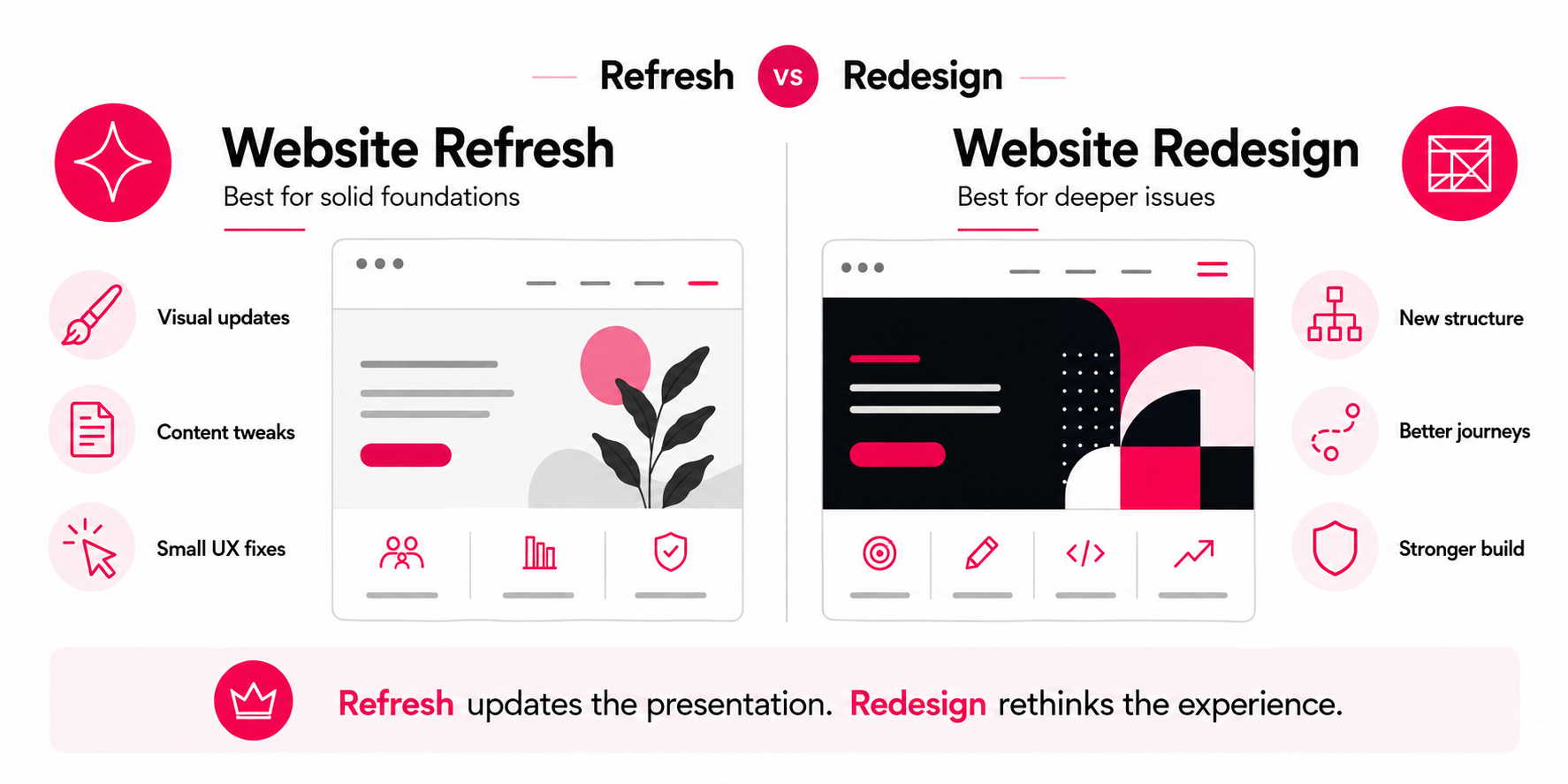
A website refresh is a lighter update to an existing website. You usually keep the same platform, core structure, URL setup and page framework, but improve how the site looks and reads.
A refresh might involve updating your colour palette, improving typography, replacing dated imagery, sharpening calls to action and tidying up mobile layouts.
It can also include selective content updates. Your services may still be accurate, but the way they are presented might feel thin or hard to scan. A refresh can improve those pages without rebuilding the whole website.
A refresh is best suited to websites where the core foundations still work. The CMS is usable, the structure makes sense, and no major technical issues are holding the site back.
For example, if your company has recently updated its logo, brand style or tone of voice, a refresh can bring the existing site into line without the cost and disruption of starting again.
What Is a Website Redesign?
A website redesign is a deeper rethink of how the site works, beyond how it looks.
It can involve new layouts and templates, revised navigation, stronger service pages, a clearer content hierarchy and better conversion paths. For WordPress projects, this often means approaching WordPress web design as both a design and content-structure exercise, rather than a visual refresh alone. In some cases, the project may also involve rebuilding the website on a stronger technical foundation.
A redesign is often needed when the current site no longer supports how the business sells or handles enquiries. The problem is rarely the visual design alone. More often, important content is buried, the mobile experience is weak, the CMS is awkward to manage, or the site has grown in a messy way over time.
A redesign can also be the right route when a business has changed direction. If your services, audience, pricing, positioning or sales process have changed, the website may need more than a visual update. It may need to be restructured around how the business now works.
Website Refresh vs Website Redesign: Key Differences
| Area | Website Refresh | Website Redesign |
|---|---|---|
| Best for | A site that works, but feels dated, inconsistent or slightly unclear | A site with deeper UX, content, structure, conversion or technical issues |
| Scope | Visual updates, content refinements and smaller user experience improvements | New layouts, navigation, templates, content structure and user journeys |
| Cost | Usually lower because less design and development work is required | Usually higher because the project involves more planning, design, development and testing |
| Timeline | Often completed faster because the core structure stays in place | Usually takes longer because the site is being reconsidered more deeply |
| SEO risk | Lower if URLs, content, metadata and internal links are mostly preserved | Higher if URLs, content, headings or navigation change without proper planning |
| CMS changes | Usually limited to smaller editing or layout improvements | May involve new templates, editable sections or a rebuilt CMS structure |
| Business impact | Improves presentation, clarity and consistency | Can improve usability, conversions, scalability and long-term performance |
Signs You Need a Website Refresh
If your site is fundamentally sound but looks and feels tired, a refresh may be enough. Signs include:
- The design feels dated compared to competitors in your industry.
- Your branding has evolved, but the website has not caught up.
- The site structure still works, but some sections need clearer wording or layout improvements.
- Your imagery, typography, colours or calls to action feel inconsistent.
- Analytics show stable traffic, but engagement has started to soften.
- Your mobile experience is acceptable, but certain sections need tightening up.
For example, an investment firm with a well-built WordPress site but dated imagery may not need a full redesign. If the page structure, CMS editing experience and search visibility are still working, the better route may be to update the visual style, strengthen the service-page presentation, add trust signals and sharpen the calls to action while keeping the existing foundations intact.
A refresh works best when the website still has a clear foundation. You are improving what is already there, instead of forcing an outdated structure to do a job it was never built for.
Signs You Need a Website Redesign
A redesign is usually the better choice when the problems are deeper than presentation. Common signs include:
- The navigation is confusing or no longer reflects your services properly.
- Important pages are difficult to find or poorly structured.
- The mobile experience is weak, slow or frustrating.
- Your website gets traffic but does not generate enough enquiries, bookings or sales.
- The CMS or theme limits what your team can edit.
- The site relies on outdated plugins, templates or technical workarounds.
- Your brand, services or audience have changed significantly.
- Your competitors explain their value more clearly than you do.
For example, an e-commerce business with slow product pages, a weak checkout journey and poor mobile usability would usually need more than a visual refresh. In that case, the design is only part of it. What matters is how the buying journey performs, how fast customers reach key products and whether the checkout gives them enough confidence to order.
A redesign gives you the chance to rethink the website around the actions you want users to take, whether that is making an enquiry, booking a consultation, buying a product or submitting a project brief.
When You May Need a Website Rebuild Instead
There is also a third option: a website rebuild.
A rebuild is needed when the technical foundation is the main issue. This often applies to older WordPress websites built on bloated themes, heavily modified templates, unsupported plugins or page builders that now make the site slow and hard to manage.
More often than not, the page builder is the reason the site needs rebuilding in the first place. Every plugin added to keep it working makes the underlying problem harder to fix, so we move clients onto a properly planned custom WordPress theme rather than stack another layer on top. That gives the site a faster, more manageable foundation.
You may need a rebuild if:
- Your CMS is difficult for your team to update.
- The site is slow because of bloated code, plugins or theme limitations.
- Important functionality is hard to extend safely.
- Your current theme is no longer supported.
- The site has become difficult to maintain without breaking layouts.
- You need better control over templates, landing pages, service pages or reusable sections.
A rebuild does not always mean changing the entire visual direction. Sometimes the design can be refreshed while the underlying WordPress theme, templates and editing experience are rebuilt properly. We build those editing screens around custom fields, so your team can update copy and images without touching the layout or breaking the design.
This is why it is worth diagnosing the real problem before choosing a route. A visual refresh will not fix a weak technical foundation, and a full rebuild is overkill if the site only needs clearer design and sharper copy.
Website Redesign vs Website Refresh: the SEO Perspective
Search performance should carry real weight in this decision.
A refresh can often preserve your existing URL structure, headings, internal links and metadata. This can make it a safer option if your website already ranks well and the main issue is presentation rather than structure.
A redesign can still be the right choice, but it needs closer SEO planning. If URLs change, content is removed, headings are rewritten or navigation is restructured without a clear plan, rankings can suffer.
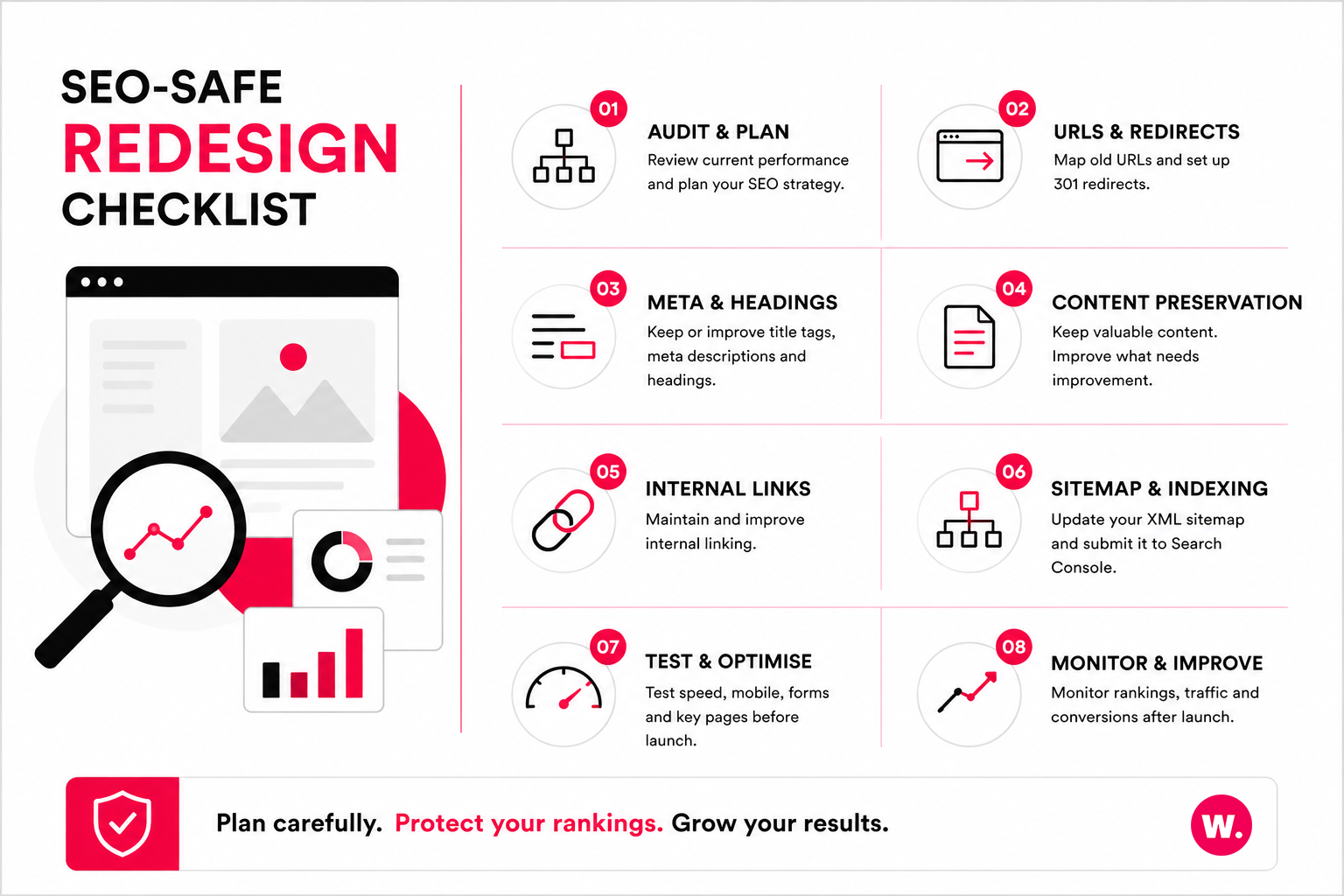
A safe redesign should include:
- A review of current rankings, organic traffic and high-value landing pages.
- A clear 301 redirect plan if any URLs are changing.
- Deliberate handling of page titles, meta descriptions and headings.
- Preservation or improvement of content that already performs well.
- Updated XML sitemaps submitted through Google Search Console.
- Pre-launch and post-launch testing across key pages.
This is the part of a migration we will not cut corners on. When we moved Iceland24 and Thubten Chodron from Blogger to WordPress, the priority was protecting the search visibility each site had already built. That meant mapping every old Blogger URL to its new WordPress equivalent and putting the redirects in place before launch, while preserving the content and metadata that already ranked. The platform changed underneath them, but the rankings they had earned did not have to.
A well-planned redesign can support stronger SEO by improving content structure, internal linking, page speed, mobile usability and user engagement. It can also create better landing pages for services that are currently underdeveloped.
The safest approach is selective: protect the pages that already perform, and improve the ones holding search performance back.
Benefits of a Website Refresh
A refresh makes sense when the site needs improvement short of a full rethink. The main benefits include:
- Lower cost: A refresh usually requires less design and development time than a full redesign.
- Less disruption: The existing structure, CMS and URLs can often stay in place.
- Faster delivery: Updates can often be completed more quickly than a full redesign project.
- SEO stability: Existing rankings are usually easier to protect when the site structure remains largely unchanged.
- Improved presentation: Stronger visuals, clearer copy and better calls to action can make the site feel more current.
A refresh can be especially useful for businesses that already have a strong website but need to bring the design, messaging or content presentation up to date. It also helps when you want to keep familiar navigation, existing page authority and a CMS setup your team already knows.
Benefits of a Website Redesign
A redesign is a larger project, but it can solve problems that a refresh cannot. The main benefits include:
- Clearer user journeys: Visitors can be guided more effectively towards enquiries, bookings or purchases.
- Better content structure: Services, case studies, resources and conversion pages can be organised around user intent.
- Stronger mobile experience: Layouts can be designed properly for smaller screens rather than patched afterwards.
- Improved performance: A redesign can remove old design and technical issues that slow the site down.
- Greater flexibility: A better CMS setup can make it easier to manage pages, sections and future campaigns.
- Better commercial alignment: The website can be reshaped around how the business now sells and communicates.
If your current site is holding back enquiries, sales, marketing or internal management, a redesign is often the more practical long-term route. It gives you the chance to rebuild the site around clearer priorities instead of adding more patches to a structure that no longer fits.
How to Decide Which Option Is Right for You
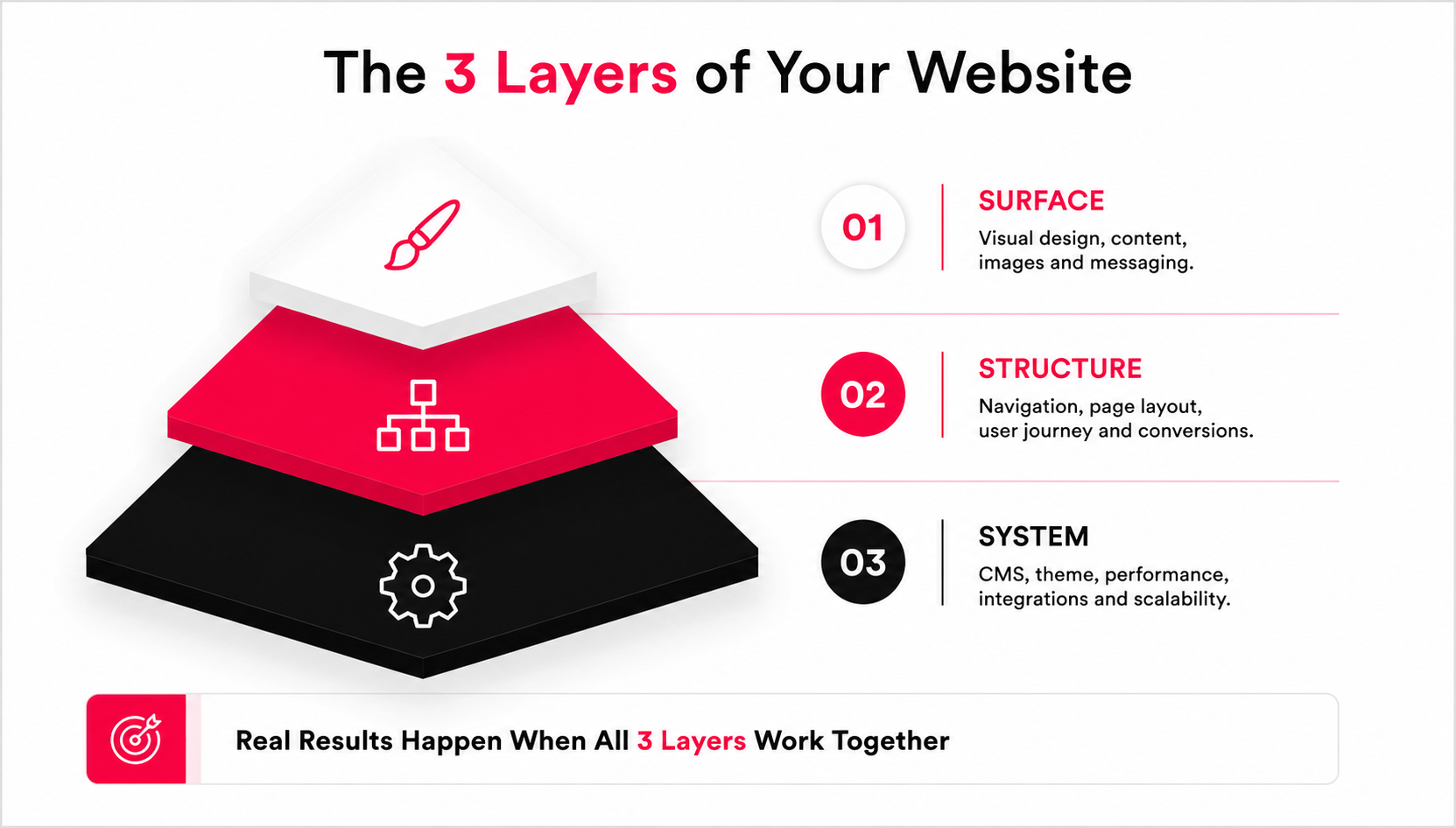
Start by separating the problem into three areas: surface, structure and system. Underneath all three sits a bigger question: can the foundation you have carry the business for the next few years, or is it already working against you?
If the issue is mostly surface-level, such as dated colours, old imagery, weak calls to action or slightly tired page layouts, a refresh may be enough.
If the issue is structural, such as confusing navigation, weak service pages, poor mobile journeys, unclear content hierarchy or low conversion rates, a redesign is usually more suitable.
If the issue is technical, such as an outdated WordPress theme, a difficult CMS, plugin bloat, slow performance or limited scalability, a rebuild may need to form part of the project.
Before deciding, review:
- Which pages currently bring in enquiries, sales or organic traffic.
- Where users drop off in analytics.
- How easy the CMS is for your team to manage.
- Whether the navigation reflects your current services.
- Whether the site works properly on mobile.
- Whether your current website supports future campaigns, content and functionality.
If the problems are mostly cosmetic, do not overcommit to a full redesign. If the problems are structural or technical, do not waste budget repeatedly patching a site that needs deeper work.
If you are unsure, an experienced web design agency should help you assess the existing website before recommending a route.
At Webpop Design, this is how we prefer to approach redesign conversations. We look at the existing website first, including its content, WordPress setup, search visibility, user journeys and conversion points, before deciding whether a refresh, redesign or rebuild is the right recommendation.
Maintaining Your Website After Launch
Whether you refresh, redesign or rebuild your website, the work does not stop at launch.
Websites age as businesses change, content grows, plugins need updating and search behaviour shifts. Regular maintenance helps extend the life of the site and reduces the chance of another major overhaul being needed too soon.
Ongoing care should include:
- Updating content, imagery and calls to action where needed.
- Monitoring analytics, search visibility and conversion rates.
- Keeping WordPress, plugins and integrations up to date.
- Checking page speed, forms and key user journeys.
- Reviewing important pages when services, offers or business priorities change.
A good website should not be treated as a one-off project. Review it regularly so it keeps supporting the business it serves.
Final Thoughts
The choice between a website redesign and a website refresh comes down to the depth of the problem.
A refresh can modernise a website that already has good foundations. A redesign can solve deeper issues around structure, content, UX, performance and conversion. A rebuild may be needed when the technical setup is limiting what the site can do.
Avoid choosing the biggest option by default. Choose the level of change that properly solves the problem.
Whichever route you choose, the real test is the foundation underneath. A redesign built on a weak one only resets the clock, and the same problems tend to resurface within a couple of years. Fix the foundation when it needs fixing, and whatever design you put on top has a stable base.
Plan the work, protect existing SEO value, and shape it around how visitors use the site. Get it right and your next website project should leave the site clearer, easier to manage and better at turning visitors into customers.
Need a Clear View Before You Commit?
If you are unsure whether your website needs a refresh, redesign or rebuild, the safest starting point is an honest review of the existing site. Looking at the structure, content, WordPress setup, search visibility and conversion paths will usually make the right route much clearer. Use our project planner to outline your goals, budget and timeline. It is the quickest way to get clear on what your website needs.
FAQs About Website Redesigns and Website Refreshes
What is the difference between a website refresh and a website redesign?
A website refresh updates the existing site without changing the core structure. A website redesign is a deeper project that can change layouts, navigation, content structure, user journeys and technical foundations.
Is a website refresh enough for an outdated website?
A refresh may be enough if the site still works well and only needs visual, content or smaller user experience improvements. If the site is hard to use, slow, difficult to manage or poorly structured, a redesign is usually a better option.
When should you redesign your website instead of refreshing it?
You should consider a redesign when the current website is affecting enquiries, sales, usability, search performance or internal management. A redesign is also more suitable when your business has changed and the site no longer reflects your services, audience or goals.
Can a website redesign hurt SEO?
Yes, a redesign can hurt SEO if URLs, headings, content, metadata or internal links are changed without proper planning. With thorough audits, redirects, content preservation and testing, a redesign can also improve search performance.
Should I refresh my website if it already ranks well?
If your site already ranks well, a refresh can be the safer route when the structure is working and the main issue is presentation. Any changes should still be mapped out so valuable pages, metadata, internal links and content are protected.
What is the difference between a website redesign and a website rebuild?
A redesign focuses on how the website looks, works and guides users. A rebuild focuses on the underlying technical setup, such as the WordPress theme, templates, CMS editing experience, plugins and codebase. Many projects include both.
How often should a business redesign its website?
There is no fixed rule. Some sites need a redesign after three years, while others can perform well for longer with regular improvements. The better question is whether the website still supports your users, business goals, search visibility and conversion paths.
How do I know whether my WordPress website needs a redesign?
Your WordPress site may need a redesign if it is difficult to edit, slow to load, hard to navigate, poor on mobile or no longer supports your content and sales process. If the theme or plugin setup is the main limitation, a rebuild may also be needed.