
 Webpop Design Marketing Team
The 60-30-10 rule offers a simple way to create a more balanced colour palette in website design. It divides your colours into three clear roles: 60% dominant colour, 30% secondary colour and 10% accent colour. Used well, it gives a website structure and consistency without making the design feel flat or overloaded.
For a business website, colour is not just decoration. It affects how users scan a page, which elements they notice first, how trustworthy the brand feels and whether calls to action stand out clearly. A clear colour system can make a website easier to use, easier to remember and more effective at guiding visitors towards enquiries, bookings, purchases or sign-ups.
Understanding how to apply the rule properly helps you make better design decisions from the start. Each colour should have a job. The dominant colour creates the overall tone, the secondary colour supports the layout, and the accent colour draws attention to the most important actions.
Key Facts About The 60-30-10 Rule In Web Design
- The 60-30-10 rule divides a website colour palette into dominant, secondary and accent colours.
- The dominant colour sets the main tone and background feel of the design.
- The secondary colour adds structure and contrast to support the main colour.
- The accent colour should be reserved for key actions, links and important interface details.
- Good colour balance improves readability and visual hierarchy.
- Strong website colour choices should be tested for contrast, accessibility and real-world usability.
- The rule works best when it supports your brand, content and conversion goals.
Definition Of The 60-30-10 Rule In Web Design
The 60-30-10 rule is a design principle used to create a balanced and consistent colour palette. The dominant colour takes up around 60% of the design and usually appears across backgrounds, large sections and the overall visual foundation. The secondary colour makes up around 30% and is used to support the main colour through sections, cards, panels, headings or interface elements. The final 10% is the accent colour, used sparingly for calls to action, links, highlights and important details.
This structure helps prevent a website from feeling visually chaotic. It also gives users a clearer sense of hierarchy. When colour is used with restraint, key actions are easier to spot and the page feels more deliberate.
Maintaining colour balance is especially important on commercial websites. A well-organised palette can support brand recognition, make content easier to scan and help users understand where to focus. The 60-30-10 rule can be applied across homepages, landing pages, e-commerce layouts, SaaS interfaces, professional services websites and content-heavy WordPress builds.

Webpop Design’s colour palette uses a strong neutral base, dark supporting contrast and a bright pink accent.
Importance Of Colour Balance
Colour balance plays a major role in how professional a website feels. Too many competing colours can make a site look busy, inconsistent or harder to trust, while weak contrast can make important actions disappear. A well-balanced palette keeps enough variety to hold interest without pulling the user’s attention from the content and actions that matter.
Applications In Web Design
In web design, the rule can be applied across backgrounds, navigation, section blocks, buttons, forms, cards, icons and links. A homepage might use the dominant colour for the main background, the secondary colour for supporting panels or content blocks, and the accent colour for enquiry buttons or important calls to action. The exact split shifts depending on the site and its goals, but the role of each colour stays the same: it should help move users through the page towards the next step.
Choosing Your Dominant Colour: The 60%
The dominant colour forms the foundation of your website’s visual style. It should reflect the brand, suit the audience and create the right overall tone. For example, a financial website design may use calm blues, deep greens or neutral tones to suggest stability and trust. A creative brand may use a warmer or more expressive colour palette, but still needs enough restraint for the site to feel usable and professional.
The dominant colour should usually be easy to live with across a full website. It may appear in large background areas, hero sections, navigation zones or subtle page structures. Because it takes up the largest share of the design, it needs to support readability rather than fight with the content.
Selecting A Base Colour
Choosing a base colour starts with the brand. Consider the type of business, the audience, the visual tone and the level of trust the website needs to create. Tools like a colour wheel can help with early exploration, but the final choice should be based on how the colour works in a real website layout, not just how it looks in isolation.
Impact Of Dominant Colours On User Experience
The dominant colour can influence how a website feels before the user reads a word. Lighter neutral colours can make a site feel open and calm. Darker palettes can feel premium or more editorial. Warm colours can create energy, while cooler colours can feel more measured. The point is to pick a colour that fits the brand and the actions users need to take, rather than one that simply looks current.
Examples Of Effective Dominant Colours
Successful websites often use dominant colours with restraint. Sites like Airbnb use soft, spacious tones to create a welcoming feel, while Spotify uses darker backgrounds with a recognisable green accent to create contrast and energy. These examples work because the colour choices are consistent and tied to clear brand behaviour.
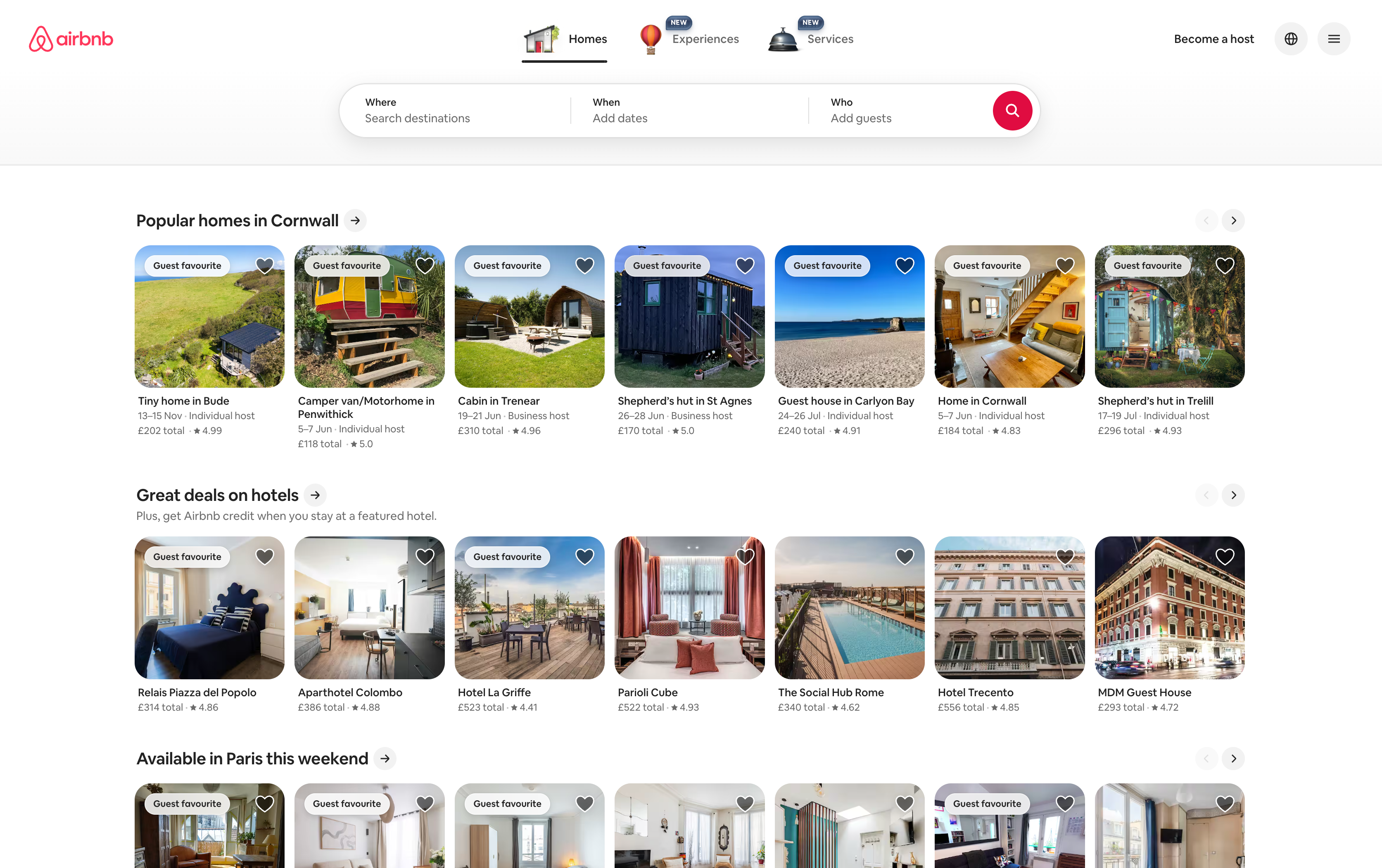
Airbnb uses a soft, restrained colour palette to create a welcoming website while keeping key actions clear.
Secondary Colour: The 30% Element
The secondary colour supports the dominant colour and gives the website more structure. It often appears in content blocks, section backgrounds, cards, borders, navigation states, illustrations or supporting interface elements. It should support the main colour rather than compete with it, adding contrast and rhythm across the page.
A good secondary colour makes the design feel more layered and easier to scan. It can help separate sections, group related content and prevent the page from feeling too plain. The strongest secondary colours usually complement the dominant colour without pulling attention away from the main message or calls to action.
Choosing a secondary colour requires a good understanding of colour theory, but it also requires practical web design judgement. A colour combination that looks good in a palette generator may not work once it is applied to text, buttons, mobile screens and real page content.
Role Of Secondary Colours
Secondary colours help organise the page. They can separate key sections, support headings, frame content cards and create visual consistency across the site. Done well, they add structure to the layout without pulling attention from the main content.
How To Choose Complementary Secondary Colours
A secondary colour should work naturally alongside the dominant colour. You might choose a softer shade from the same colour family, a neutral supporting tone or a stronger contrast colour. The right choice depends on the brand, the audience and how much visual energy the design needs.
Examples Of Effective Secondary Colour Use
Many successful websites showcase secondary colours through section backgrounds, feature blocks and supporting interface details. On a service-led website, the secondary colour might help separate case studies, testimonials or process sections. On an e-commerce site, it might support product cards, filters or promotional panels.
The Finishing Touch: The 10%
The final 10% of your colour palette is usually the accent colour. This is the colour that should draw attention to the most important elements on the page. In web design, that often means buttons, links, form actions, key labels, notification states or high-priority highlights.
The accent colour works best when it is used sparingly. If every element is treated as important, nothing stands out. A strong accent colour gives users a clear visual signal and helps guide them towards the next step.
Defining The Small Details
Small colour details can have a big impact on usability. The accent colour can help users identify what is clickable, what is important and where they should act next. This is especially useful for enquiry buttons, booking buttons, add-to-cart buttons and form submission actions.
Choosing The Right Highlight Colours
The right highlight colour should contrast clearly with the surrounding design while still fitting the brand. It should also be tested for accessibility and readability, especially when used behind text. As a baseline, WCAG AA asks for a contrast ratio of at least 4.5:1 for normal text and 3:1 for large text and interface elements such as buttons. In many cases, a slightly stronger or more saturated colour works well for actions, while softer variations can be used for less important highlights.
Examples Of Effective Highlights
Effective accent colours are easy to see but not overused. For instance, Amazon uses strong button colours to make buying actions clear. Whatever colour you choose, your most important actions should be the easiest things to spot on the page.
How The 60-30-10 Rule Works On A Homepage
On a homepage, the 60-30-10 rule can help create a clear path from first impression to action. The dominant colour might shape the hero area, background and overall page tone. The secondary colour can separate service sections, case studies, testimonials and feature blocks. The accent colour should then guide users towards the most important actions, such as requesting a quote, booking a call or viewing recent work.

Everymind at Work uses a calm, blue-led homepage palette with clear contrast and a strong demo CTA.
For example, a professional services website might use a light neutral dominant colour to keep content easy to read, a deep blue secondary colour to create authority, and a warmer accent colour for enquiry buttons. An e-commerce website might use a cleaner white or off-white foundation, a brand colour for product areas and a high-contrast accent for basket and checkout actions.
This is where the rule becomes useful commercially. It helps stop every section competing for attention. Instead, the page can guide users through the content in a more controlled order, from the headline and supporting message through to proof, services, examples and the final call to action.
How Webpop Design Approaches Website Colour Palettes
At Webpop Design, we treat colour as part of the wider website design system rather than a set of isolated visual choices. A palette has to work across desktop, mobile, navigation, flexible content sections, buttons, forms, blog layouts, case studies and WordPress editing controls.
We check how colours support the brand, how they behave in real layouts and whether they actually make the site easier to use. A strong colour palette should help users understand the page, trust the business and take the next step without confusion.
That means checking contrast, button visibility, hover states, form fields, mobile readability and how the palette works across both short landing pages and longer content-led pages. The aim is a website that looks right, works hard for the business and stays easy for the client to run.
Common Pitfalls In Colour Selection
Choosing colours for a website can go wrong when the palette is based only on personal preference or visual trends. A colour scheme needs to work across different screen sizes, backgrounds, content lengths and user journeys. It also needs to support accessibility, brand recognition and conversion.
Testing colour combinations is essential. A palette may look good in a static mock-up but feel weak once it is used across a full website. Buttons may not stand out, text may lose contrast, or too many highlights may make the page harder to scan.
1
Overusing Bright Colours
Bright colours can be useful for emphasis, but excessive use quickly creates visual noise. If bold colours appear everywhere, users have no clear signal about what matters most. A more restrained palette usually creates a stronger and more professional result.
2
Ignoring User Expectations
Colour choices should suit the audience and the type of website being designed. A luxury service, financial brand, restaurant, SaaS product and charity website will all need different visual signals. Good modern website design balances brand personality with the expectations users bring to that sector.
3
Failing To Test Combinations
Testing colour combinations can reveal issues that are not obvious in the first design draft. A palette that looks attractive may not provide enough contrast, may perform poorly on mobile or may make key actions less visible. Checking colour choices in context helps avoid these problems before launch.
Practical Checklist For Implementing The 60-30-10 Rule
Implementing the 60-30-10 rule starts with defining clear roles for each colour. Choose the dominant colour first, then select a secondary colour that supports the structure of the site, and finally choose an accent colour that can be reserved for important actions.
Once the palette is in place, test it across real page layouts. Look at buttons, forms, headings, navigation, mobile states and longer content pages. A colour system should hold up across the whole website, not only on the homepage.
Select A Dominant Colour
Begin by choosing a dominant colour that suits the brand and creates the right foundation for the website. This colour should be strong enough to define the design, but calm enough to support readability and repeated use across multiple pages.
Choose A Supporting Secondary Colour
Select a secondary colour that adds structure without competing with the dominant colour. Use it for supporting sections, interface areas, cards, panels or visual breaks that help users move through the page.
Reserve The Accent Colour For Important Actions
Use the accent colour with discipline. It should help users identify the most important actions, such as making an enquiry, booking a call, buying a product or submitting a form. If it appears too often, it loses its purpose.
Test Your Colour Choices
Testing colour choices on different devices is essential. Colours can shift between screens, and contrast issues often become more obvious on mobile. Check readability, button visibility and accessibility before committing to the final palette.
Adjust Based On Real Feedback
Feedback can reveal whether your colour choices are helping or hurting the user journey. If users miss key buttons, struggle to read content or find the site visually confusing, the palette should be refined. The goal is a website that is clearer and easier to act on, not simply one that looks better.
Need A Better Website Colour Palette?
A strong website colour palette makes your site easier to use, more trustworthy and clearer to act on. If your current website feels inconsistent, dated or difficult to navigate, colour may be part of the problem, but it is usually connected to wider layout, content and UX issues as well.
Webpop Design creates bespoke websites with clear visual systems, practical WordPress editing controls and layouts built around real business goals. You can view examples of our work in our website design portfolio or learn more about our web design services.
FAQs About The 60-30-10 Rule In Web Design
What is the 60-30-10 rule in web design?
The 60-30-10 rule is a colour balance method used to divide a website palette into three roles: 60% dominant colour, 30% secondary colour and 10% accent colour. It helps create a cleaner, more consistent design that is easier to follow.
Is the 60-30-10 rule good for website colour palettes?
Yes, it is a useful starting point for website colour palettes because it gives each colour a clear purpose. It can help avoid visual clutter, improve hierarchy and make important actions easier to identify.
Should CTA buttons use the 10% accent colour?
In many cases, yes. The accent colour is often best reserved for important actions such as enquiry buttons, booking buttons, add-to-cart buttons or form submissions. This helps users quickly understand where to click next.
Does the 60-30-10 rule replace accessibility testing?
No. The rule helps with colour balance, but it does not guarantee accessibility. Colours still need to be tested for contrast, readability, colour blindness considerations and usability across different devices.
Can you break the 60-30-10 rule?
Yes. The rule is a guide, not a fixed law. Some websites need more neutral space, some need stronger brand colour usage and some need additional functional colours for alerts, categories or product states. The important thing is that the colour system remains clear and usable.