
 Webpop Design Marketing Team
When you ask “how much does a custom WordPress plugin cost”, you are usually after a number you can commit to before you sign anything. You want a figure you can defend to whoever signs it off, and a plugin that keeps working after launch.
Most pricing pages give you a range, then skip the detail that decides where your project lands. Your budget sits in that detail, because plugin work adds rules, data, edge cases, and support load.
We have priced and built WordPress plugin development projects for businesses that needed admin tools, WooCommerce changes, API connectors/importers and other system links. The cost tracks hours and risk involved, so this guide focuses on the parts that drive both.
Custom WordPress Plugin Cost in 2026
- Most custom WordPress plugins cost between £2,000 and £50,000 in 2026.
- A small plugin with one focused feature may sit between £2,000 and £6,000.
- A more complex plugin with workflows, integrations, WooCommerce logic, reporting or permissions can reach £15,000 to £50,000+.
- The biggest cost drivers are usually the rules, data, integrations, testing, security checks and support requirements behind the plugin.
- If the plugin touches checkout, customer accounts, payments or external systems, expect a higher budget because the risk is higher.
WordPress Plugin Cost Ranges for 2026
Most custom WordPress plugins in 2026 sit between £2,000 and £50,000. Your price depends on the functionality you need, the data you touch, the number of roles, and whether you connect to external systems.
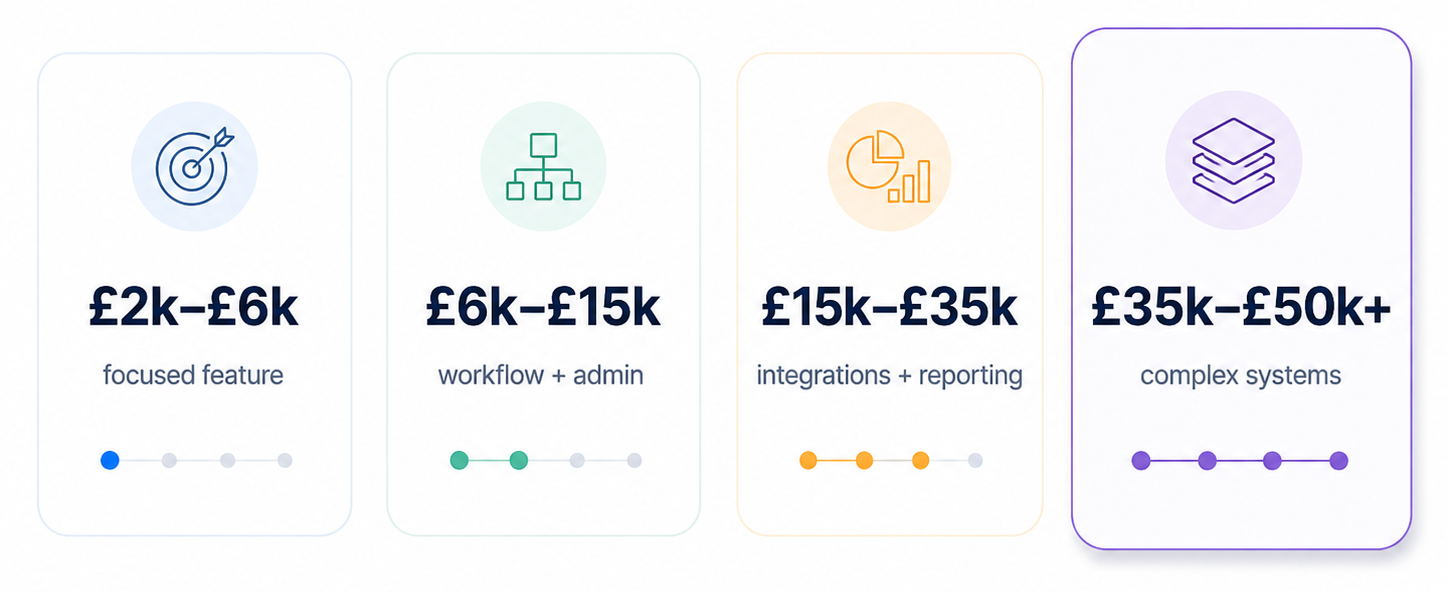
Typical custom WordPress plugin cost ranges based on scope, integrations and testing requirements.
If your supplier charges £120 per hour, a single development day costs £960 at eight hours. Use that figure to convert quotes into days, then ask what each day produces and proves.
The simplest place to start is to drop your plugin into one band, then refine it from there. Each band assumes discovery, testing, and launch support, not just time spent writing code.
- £2,000 to £6,000 covers one focused feature, minimal admin UI, limited data, and no external integrations.
- £6,000 to £15,000 covers multi-step workflows, a few admin screens, data storage, and light integration.
- £15,000 to £35,000 covers integrations, roles and permissions, reporting, background tasks, and staged release support.
- £35,000 to £50,000+ covers complex integrations, audit logs, performance work, and phased releases with monitoring and support.
If those bands feel high, compare them with the cost of manual work, errors, and plugin conflicts you deal with now. A plugin often replaces manual tasks and removes the need for several overlapping plugins you currently pay for.
What “Custom Plugin” Means for Pricing
“Custom plugin” can mean anything from a settings page to a new system inside WordPress. The price depends on what the plugin must store, change, display, and protect for each user role.
A small plugin usually adds a single behaviour, with one screen to configure it. A larger plugin adds a data model, admin screens, permissions, exports, background tasks, and integration points.
If you want a price that holds, describe outcomes in terms of actions and results, not feature labels. A developer can estimate actions, data, and rules without filling gaps with guesswork.
Custom Plugin vs Existing Plugin: Which Costs Less?
Building from scratch is not always the cheapest or best route. If an existing plugin already handles most of the job well, it may be cheaper to extend it, customise it, or connect it to another system.
The important word is “if”. An existing plugin can only be adapted cleanly when it has the right hooks, filters, settings, data structure, licence terms, and update path. If it was not built to support the change you need, customising it can become awkward and more expensive than expected.
Directly editing a third-party plugin is usually a bad idea because updates can overwrite the changes, break the feature, or leave your site stuck on an old version. A safer approach is to extend the plugin from the outside, using supported hooks or a separate custom plugin that works alongside it.
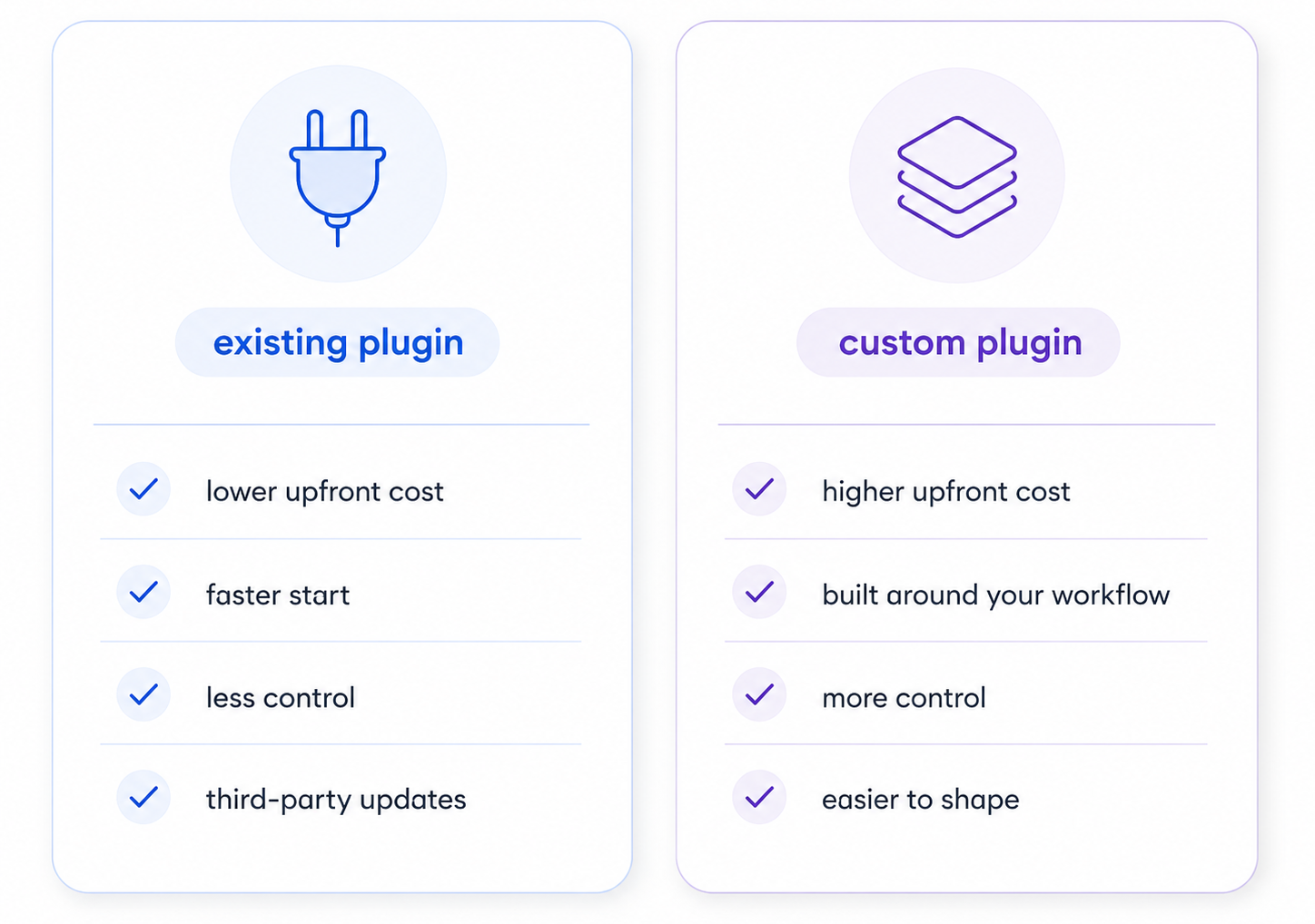
When an existing plugin is enough, and when a custom WordPress plugin makes more sense.
The trade-off is control. Existing plugins can reduce initial development time, but they also bring someone else’s structure, update cycle, code quality and feature decisions. A custom plugin costs more upfront, but it can be built around your workflow, your data and how your team works.
As a rough rule, adapting an existing plugin works well when the change is small, supported and update-safe. A custom plugin makes more sense when the logic is business-critical, unusual, sensitive, or difficult to manage with several plugins layered together.
Why WordPress Plugin Development Quotes Vary
Two suppliers can read the same email and price different projects because the email leaves out the hard parts. When you write “it should integrate with X”, you do not describe failure handling, logs, retries, and support needs.
One team includes discovery, QA, and launch support because those steps protect outcomes you can test. Another team quotes build time only, then bills changes and fixes as the work unfolds.
If a quote looks lean, ask how the team will structure the plugin so it stays maintainable as your site grows. The WordPress Plugin Developer Handbook gives you a baseline for what proper plugin work includes, beyond the feature list.
If you want quotes you can compare, ask each supplier what they include in these areas. You will see why one quote looks low, and where your budget can grow later.
- Discovery and specification
- Testing and regression checks
- Deployment, rollback, and monitoring
- Documentation and handover
- Bug fixing window after launch
- Ongoing maintenance and updates
What’s Included in a Plugin Development Budget?
A plugin budget covers more than code because your site and your stack have constraints that code must respect. When you pay for a build that holds up, you pay for choices that stop a small feature from breaking checkout.
Here is how I split plugin work when I estimate, because it keeps pricing tied to outcomes. Each line maps to something you can review, test, and sign off.
- Discovery turns your goal into a plan with users, roles, data, constraints, and success checks you can measure.
- Specification turns the plan into screens, rules, and acceptance checks that reduce scope drift.
- Build covers plugin structure, settings, admin UI, hooks, and data handling that fits your theme and plugins.
- QA covers testing, fixes, and checks against your site setup, not a blank WordPress install.
- Launch covers deployment, backups, rollback steps, and checks that confirm behaviour in production.
- Handover covers documentation, a walkthrough, and a plan for updates, support, and change requests.
If someone quotes a plugin without discovery and QA, the risk does not disappear, it lands on you instead. You usually pay for that risk later through changes, bugs, or support incidents.
The Biggest Custom Plugin Cost Drivers
Most people assume design drives cost, but data and rules drive cost more in plugin work. Every rule adds another path through the system, and every path needs tests and support handling.
Integrations and Data Sync
Integrations add failure states because external systems go down, rate limit you, or return unexpected values. You need retries, timeouts, logs, and alerts so your team can diagnose issues without code changes.
If you connect to a CRM, stock system, or accounting tool, plan for mapping and change handling. A request like “send orders to X” turns into a set of rules that must stay stable.
- Field mapping between systems
- Retries, timeouts, and error handling
- Logging that support can use
- Admin tools to retry or resolve failures
Permissions and User Roles
Role-based access adds scenarios because you must control who can view, edit, approve, export, and delete. Each permission choice creates more UI states, more edge cases, and more testing time.
Permissions also overlap with security, because every action needs a clear rule on who can do what. The WordPress security guidance is a useful reference for the checks that should sit behind every admin screen, export, and form submit.
A plugin used by one admin costs less than a plugin used by several teams with different access needs. If your plugin touches customer data, you need tighter controls and clearer logs.
- Capability checks for every action
- Separate views for different roles
- Audit trails for changes and approvals
- Export controls for data handling
WooCommerce Changes
WooCommerce work can look small, but checkout logic carries real risk, so we build in extra testing time. A small change can affect tax, shipping, payment flow, refunds, and reporting if it is handled poorly.
If you need pricing rules, fees, fulfilment logic, or checkout fields, budget for testing across cases. You need checks across products, coupons, shipping zones, and payment methods you use.
- Checkout and cart rule testing
- Compatibility with extensions
- Handling refunds and order updates
- Edge cases across shipping and tax
Background Tasks and Reporting
Dashboards and reports add cost because they require data models, filtering, exporting, and performance work. If your report reads large datasets, you need query work and caching choices that fit your hosting.
Background tasks add work because you must schedule them, track them, and handle failures. Admins also need visibility into what ran, what failed, and how to retry without causing duplication.
- Queue design and status tracking
- Logs and admin visibility
- Performance work for large datasets
- Exports and filters that match user needs
Turning Scope and Rate Into an Accurate Price
Rate explains your cost per day, but scope decides how many days you need for delivery and proof. If your lead developer costs £120 per hour, you want each day to map to something you can review.
Ask for a breakdown that links tasks to outcomes, not just “development” as a single line item. You should be able to point at each part of the estimate and say what it adds to the finished plugin.
When a supplier shows their breakdown, you can trim cost by removing scope without breaking outcomes. You can also split delivery into phases, which reduces risk and gives you earlier value.
A simple payback check helps you pick the right band. If the plugin saves your team three hours a week and your internal cost is £35 per hour, that is £5,460 a year in time alone, before you count the errors and support tickets you avoid.
Estimating WordPress Plugin Cost Using Day Rates
You can estimate cost by turning your plugin into a list of user actions and system responses. This works even if you do not write code, because users describe value better than feature lists.
Start with these questions and write the answers in plain language, with examples from your process. You can do this in one hour, then send it to a supplier for a quote.
- Who uses the plugin, and what do they do in a normal week inside WordPress?
- What data goes in, what data changes, and what data comes out, with two real examples?
- What should happen when the process fails, and what message should the user see?
- What needs approval, who approves it, and what record do you need afterwards?
- What must happen when an external system is down, slow, or returns an error?
Once you have that, you can map the work to days in a way that holds up in conversation. If your supplier charges £120 per hour, you can translate their estimate into days and sanity check it.
- Discovery and specification often takes two to six days for plugins with rules, roles, and integrations.
- Build often takes five to twenty-five days depending on screens, data, and integration complexity.
- QA and launch often takes three to ten days depending on site complexity and change risk.
If your plugin touches checkout, payments, or customer accounts, expect extra QA and staging time. You protect revenue by catching issues before customers do, and that protection costs time.
Two Real Custom Plugin Cost Breakdowns
Admin Workflow Plugin With Approvals
A client wanted a workflow inside WordPress to collect requests, approve them, and notify staff across departments. They needed an admin list, a detail view, an approval step, and a record of changes.
We built a custom post type, admin screens, a permission model, and notifications with status handling for each role. The quote landed in the £12,000 to £18,000 band because rules and permissions drove testing work.
The value came from removing email chains and spreadsheets used to track approvals across teams. The plugin created one place for status, accountability, and exportable records for management.
WooCommerce Custom Logic and System Link
A business wanted WooCommerce orders to push into a fulfilment system with packing rules and exceptions. They also needed a dashboard to view sync status, retry failures, and export exceptions for support.
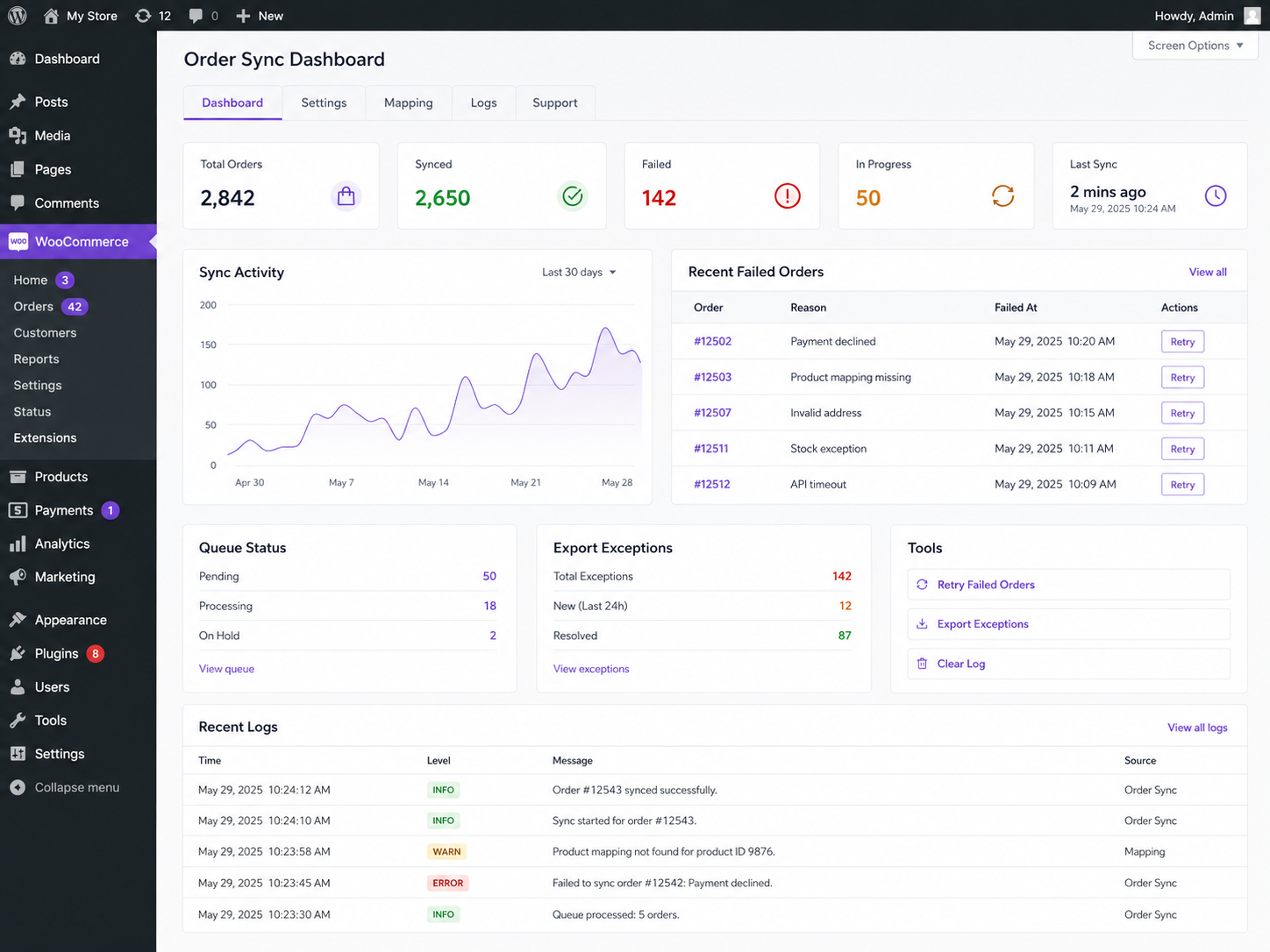
Custom WooCommerce dashboard built to monitor order syncs, retry failures and export support exceptions.
We built a queue, logging, retries, admin screens, and tools to resolve problems without developer involvement. This WooCommerce build landed in the £30,000 to £45,000 band because integration risk and support design drove time.
They stopped losing orders to sync failures, and support stopped guessing which orders failed and why. That shift cut staff time and reduced customer complaints tied to fulfilment delays.
Cutting Plugin Development Costs Without Cutting Outcomes
We keep cost down by building the smallest plugin that solves the problem, which often means talking clients out of features they will not use. The projects that stay on budget start with outcomes, data examples, and edge cases agreed before build starts.
These changes cut both time and risk, which tends to lower quotes without hurting delivery quality. You can apply them before you ask for pricing, and you can save weeks in change loops.
- Start with one workflow and one role, then add roles in a second phase once the process works.
- Use one admin screen and one export first, then add dashboards when you know which fields matter.
- Reuse existing data structures where possible, so your team does not learn a new model for daily work.
- Decide what happens on failure, and write the exact message users should see on screen and by email.
- Provide staging access and real data examples, so testing reflects your production setup and constraints.
If you want speed, avoid building five features at once because each feature multiplies test cases. Split delivery into phases and ship the smallest version that proves the workflow and rules.
Ongoing WordPress Plugin Maintenance Costs After Launch
A plugin that works today must keep working after WordPress, WooCommerce, and other plugins update in production. If you rely on the plugin for revenue or operations, those updates become a business risk.
Budget for maintenance even if you buy a one-off build, because websites change through upgrades and content growth. Maintenance often includes compatibility checks, bug fixes, and small changes driven by your process.
A simple approach is to set aside a monthly budget that covers updates and small improvements. This protects you from breakage and downtime, and it keeps the plugin aligned with how your team works.
Ask any supplier how they handle updates, and ask who owns the plugin code after handover. If you want internal ownership, ask for documentation and a walkthrough your team can reuse.
A Quote Request Template That Works
If you send a one-page brief that answers these points, you will get estimates you can compare. You will also avoid vague quotes that change when development starts and edge cases appear.
- Your goal, written as a before and after, with one example of the manual work you want removed.
- User roles, with permissions for view, create, edit, approve, export, and delete, plus admin access.
- Data inputs and outputs, with two real examples of each, and where the data should live in WordPress.
- Integrations, with triggers, field mapping, and what should happen when the other system fails.
- Acceptance checks written as “when I do X, the system should do Y”, including failures and messages.
When you share this brief, ask for an estimate that splits work into phases with outcomes and acceptance checks. You get more control over scope, and you can stop after phase one if it meets the need.
I scope plugins by mapping user actions to data changes, edge cases, and acceptance checks, then pricing the work in phases. That approach keeps quotes tied to outcomes you can test, rather than guesswork that surfaces mid-build.
Next Steps for a Reliable Plugin Quote
If you want help scoping your build, start with our WordPress plugin developers service page. It will help you frame the problem, the scope, and the constraints before you request a quote.
If you want to move from “range” to “budget”, share your workflow, your data examples, and your success checks. We can then tell you which band your plugin fits, what pushes it up, and what to cut if you need a lower budget.
If you already know what you want to build, the quickest route is to use our project planner and send your requirements. We will come back with a scoped range, a phased approach, and a plan you can sign off and schedule.
You do not need a perfect spec to get started, but you do need clarity on outcomes, users, and data. If you can explain what you want the plugin to change inside your business, the pricing becomes a planning exercise rather than a guess.
Frequently Asked Questions
How much does it cost to develop a WordPress plugin from scratch?
A custom WordPress plugin built from scratch usually costs between £2,000 and £50,000+. A simple plugin may sit at the lower end, while plugins with WooCommerce logic, integrations, reporting, permissions or background tasks need more planning, development and testing.
Why do custom WooCommerce plugins cost more than WordPress plugins?
WooCommerce plugins often cost more because they can affect checkout, payments, tax, shipping, refunds, stock, customer emails and reporting. Even a small change can create wider risks, so WooCommerce work usually needs more testing than a standard WordPress plugin.
What affects WordPress plugin development cost the most?
The biggest cost drivers are scope, data, business rules, integrations, user permissions, admin screens, security, testing and launch support. A plugin that changes one small behaviour costs far less than a plugin that manages workflows, syncs data or affects customer transactions.
Is it cheaper to customise an existing WordPress plugin?
Sometimes. Customising an existing plugin can reduce cost if the plugin already does most of what you need. It becomes less useful when the existing plugin is hard to extend, poorly maintained, slow, bloated, or built around a workflow that does not match your business.
How long does custom WordPress plugin development take?
A small plugin may take a few weeks. A more complex plugin can take several months, especially if it includes integrations, WooCommerce logic, user roles, reporting or staged testing. The timeline depends on how many workflows, rules and edge cases need to be planned and tested.
Do I own the code for a custom WordPress plugin?
You should confirm this before work starts, because not every supplier hands it over. With our bespoke plugin work you own the custom code after payment and get the documentation to maintain it elsewhere, so there is no lock-in. The exception is any pre-existing libraries, frameworks or licensed components, which keep their own terms.
What ongoing costs should I budget for after launch?
Budget for maintenance, compatibility checks, bug fixes and small improvements after WordPress, WooCommerce, PHP or other plugins update. The more important the plugin is to revenue or operations, the more important ongoing support becomes.